Use cases
Revoke, renew & handle expiry
Cut off access, extend a term without a new key, and know exactly what the app sees at expiry, during grace, and after revocation — plus how that differs from a self-hosted instance licensing itself.
Goal. You need to end a customer’s access now (a chargeback, abuse, a mistaken issue), extend a paying customer’s term without reissuing their key, and understand precisely what the running app shows as a term winds down.
When to use it
- Use this if you sell term (annual/subscription) licenses and renew them, or ever need to revoke a key.
- Use this if you’re deciding how aggressively to fail — how quickly a revoke or expiry reaches a machine that’s currently offline.
- Not this if you only ship perpetual licenses that never expire and are never revoked — then this page is just the “break glass” revoke path. Moving a seat between machines is activation & deactivation, not revoke.
Two lifecycles share this page and must not be confused. The customer license lifecycle (your end-users’ keys) behaves the same whether you run on Cloud or self-hosted. The self-hosted instance lifecycle is a different thing — the instance’s own key that grants it the right to run — covered at the end and in Licensing & editions.
What you do (vendor side)
All three actions re-sign the license server-side; the customer keeps the same key and simply re-activates (usually automatically at startup) to pick up the change.
Revoke — cut off a key:
curl -X POST $BASE/admin/licenses/LIC-…/revoke -H "X-Admin-Token: $TOKEN"
# the dashboard's per-row Revoke action does the same. Many at once: POST /admin/licenses/bulk-revoke
Renew / extend a term — push the expiry out (and optionally change seats), no new key:
curl -X POST $BASE/admin/licenses/LIC-…/renew -H "X-Admin-Token: $TOKEN" -H "content-type: application/json" \
  -d '{"expiryUtc":"2028-10-12T00:00:00Z"}'
# seats can be changed here too; a renewal re-signs the license in place. The key is unchanged.
Both live on the license’s own page: Renew sits in the action row, and Revoke is in the Danger zone.
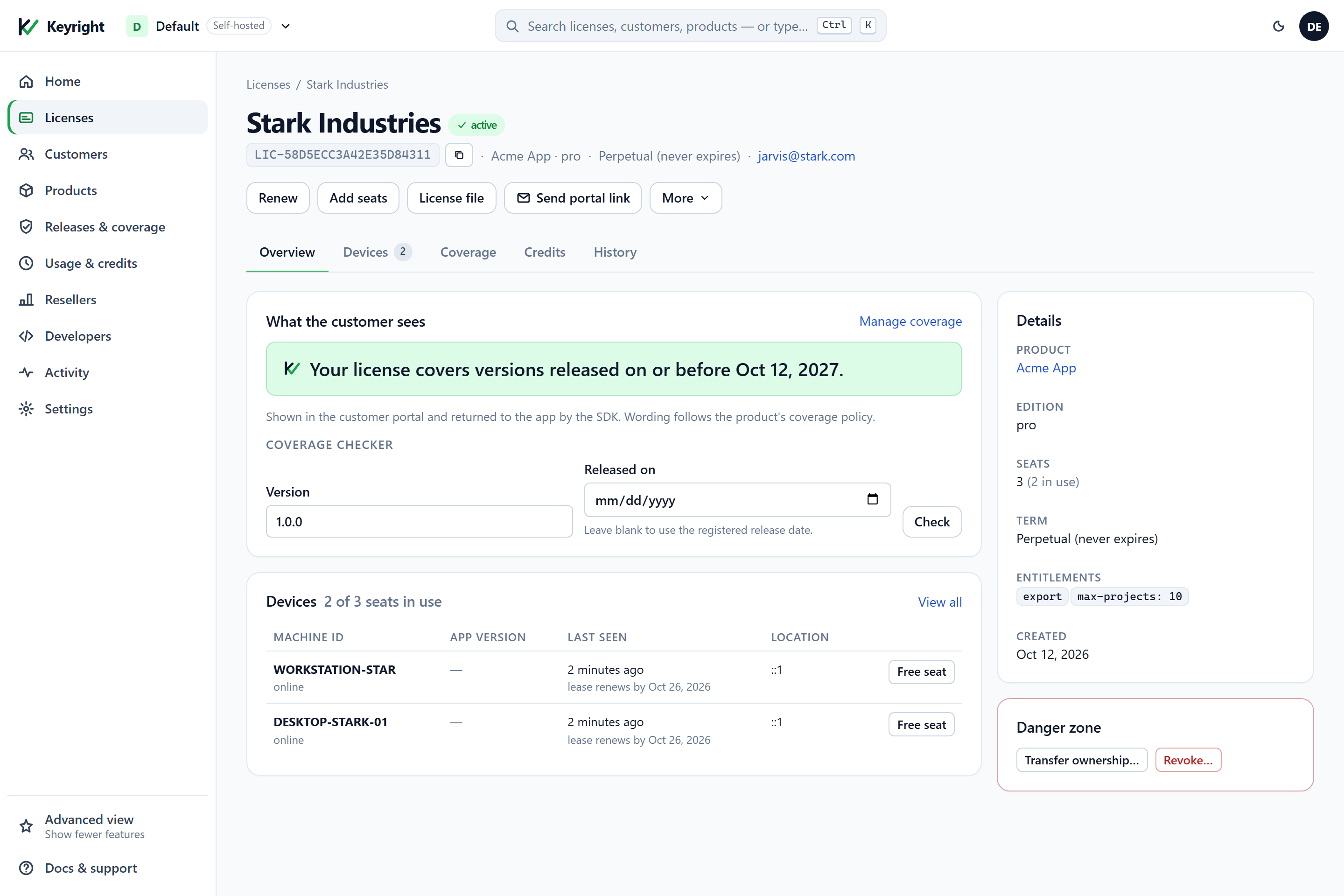
Expiry is just the license’s expiryUtc arriving with no renewal — you don’t do anything; the behavior below kicks in on its own. (A refund/cancel from a store webhook revokes automatically — see Auto-issue keys from a store.)
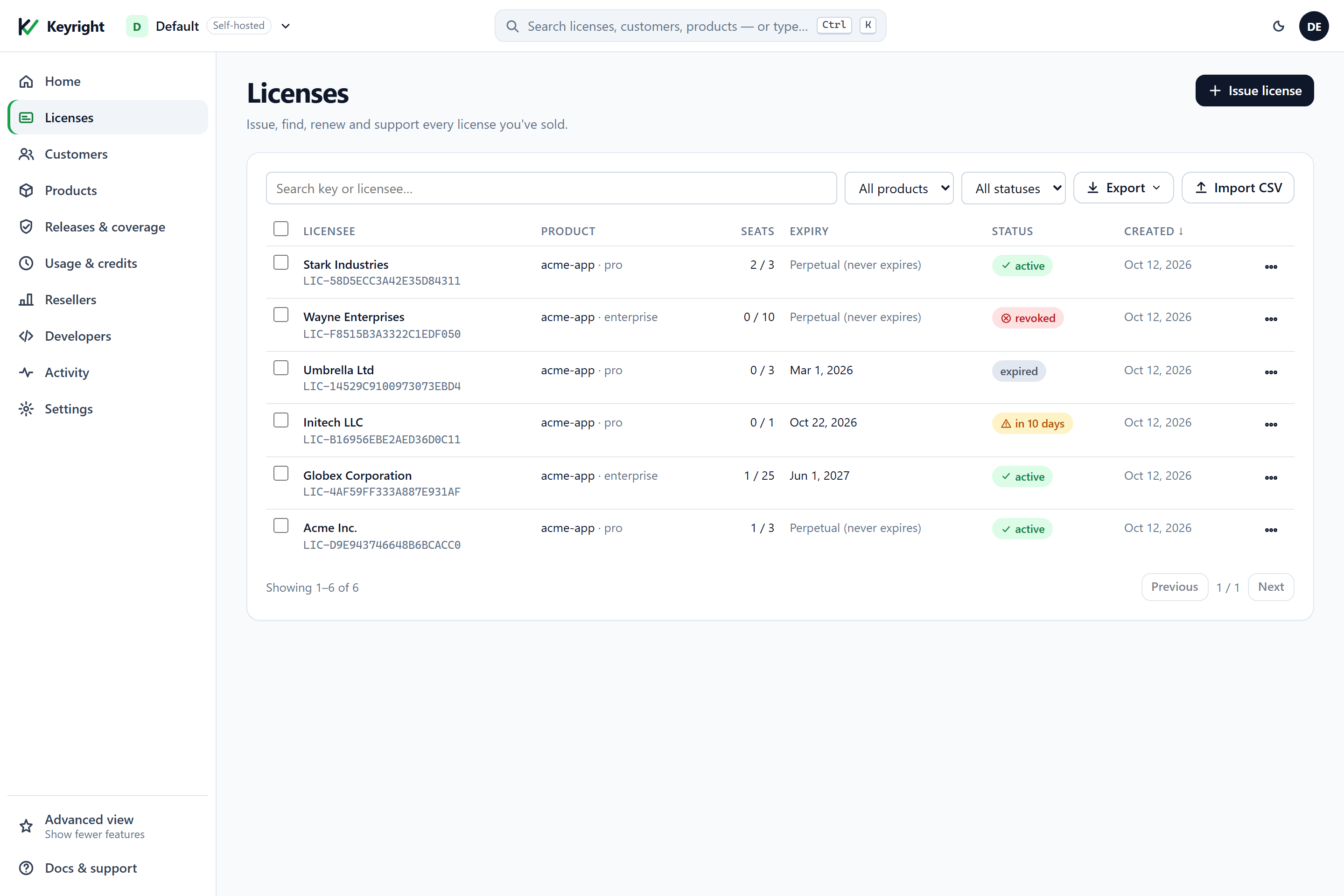
Every state in this lifecycle shows on the Licenses list, so you can spot a revoked, expired or soon-to-expire key at a glance:
LicenseInfo.Status.How fast a change reaches the machine
A revoke or a renewal is applied on the device’s next online check, because the app runs offline against a cached lease between checks. The lease TTL (default 14 days, KEYRIGHT_LEASE_TTL_DAYS) is exactly the knob: a connected app that re-activates at startup picks up a revoke within its refresh cadence; a machine that’s been offline won’t see it until it comes back, and no later than when its lease grace window elapses and it’s forced to re-check. Shorten the TTL to make revocations and seat changes bite sooner, at the cost of less offline tolerance. For offline enforcement with no network at all, ship a signed revocation list with your build (RevocationListJson / RevocationListPath) so a purely offline app still honors a revoke.
In your code
Your app reads everything off LicenseInfo — it never parses a key. The relevant members, in every SDK and over raw HTTP:
.NET
LicenseInfo info = await License.ActivateAsync(key, ct);   // or License.Validate() offline; both fail closed

// Status is the single source of truth — branch on it.
switch (info.Status)
{
    case LicenseStatus.Valid:    break;                     // licensed; fall through to the badge below
    case LicenseStatus.Expired:  return ShowRenewPrompt(info.Message);   // term ended, or trial over
    case LicenseStatus.Revoked:  return ShowUnlicensed(info.Message);    // key was revoked
    default:                     return ShowUnlicensed(info.Message);    // NoLicense, SeatLimit, SignatureInvalid, …
}

// While valid, surface the countdown and nudge before renewal.
if (info.IsExpiringSoon())                                   // true inside the renewal window
    ShowRenewBanner($"{info.DaysRemaining} days left");      // DaysRemaining counts down to expiryUtc
string badge = info.ExpiryUtc is null
    ? "Licensed — perpetual"                                 // no expiry
    : $"Licensed — expires {info.ExpiryUtc:d}";
Node.js
const { info } = license.validate();                 // or: info = await license.activate(key)
switch (info.status) {
  case 'valid':    break;                                      // licensed
  case 'expired':  return showRenewPrompt(info.message);       // term ended, or trial over
  case 'revoked':  return showUnlicensed(info.message);        // key was revoked
  default:         return showUnlicensed(info.message);        // no_license, machine_mismatch, …
}
if (info.daysRemaining != null && info.daysRemaining <= 14)    // nudge before renewal
  showRenewBanner(`${info.daysRemaining} days left`);
const badge = info.expiryUtc ? `Licensed — expires ${info.expiryUtc.toLocaleDateString()}`
                             : 'Licensed — perpetual';
Python
info = license.validate_info()                       # or: info = license.activate(key)
if info.status == LicenseStatus.VALID:
    pass                                             # licensed
elif info.status == LicenseStatus.EXPIRED:
    return show_renew_prompt(info.message)           # term ended, or trial over
elif info.status == LicenseStatus.REVOKED:
    return show_unlicensed(info.message)             # key was revoked
else:
    return show_unlicensed(info.message)             # NO_LICENSE, MACHINE_MISMATCH, …
if info.days_remaining is not None and info.days_remaining <= 14:
    show_renew_banner(f"{info.days_remaining} days left")
badge = "Licensed — perpetual" if info.expiry_utc is None else f"Licensed — expires {info.expiry_utc:%x}"
Java
LicenseInfo info = client.validateInfo();            // or: info = client.activate(key)
switch (info.status) {
    case VALID:   break;                                   // licensed
    case EXPIRED: return showRenewPrompt(info.message);    // term ended, or trial over
    case REVOKED: return showUnlicensed(info.message);     // key was revoked
    default:      return showUnlicensed(info.message);     // NO_LICENSE, MACHINE_MISMATCH, …
}
if (info.isExpiringSoon(14))                               // nudge before renewal
    showRenewBanner(info.daysRemaining() + " days left");
String badge = info.expiryUtc == null ? "Licensed — perpetual"
                                      : "Licensed — expires " + info.expiryUtc;
Any language (raw HTTP)
curl -s -X POST "$BASE/v1/validate" -H "content-type: application/json" \
  -d '{"key":"LIC-…","machineId":"<stable-machine-id>","product":"acme-app"}'
# status "revoked" -> drop to Free; "expired" -> prompt to renew; "ok" -> verify the lease and read
# licenseExpiryUtc for the countdown. Fail closed on anything but a valid, in-date lease.
What each surfaces as the term winds down:
DaysRemainingcounts down toexpiryUtc;IsExpiringSoon()turns true inside the renewal window, so you can prompt before access ends.- At expiry or after a revoke,
IsPaidgoesfalseand the app drops to its Free/unlicensed state — Keyright fails closed, it does not throw.Statustells you which (ExpiredvsRevoked) so you can word the prompt (“renew” vs “contact us”). - After a renewal, the next
ActivateAsync/Validate()returns the laterExpiryUtc— no key re-entry, no reactivation dialog.
There is no in-app “grace window” for a term license: the moment expiryUtc passes (and the machine next validates), the app is Expired. The lease’s 14-day window is a connectivity cushion — it lets a machine run offline against a still-valid term — not an extra grace after the paid term ends. If you want to keep older versions working after a subscription lapses, that’s release coverage’s subscription-with-fallback, not an expiry grace.
Raw-HTTP consumers see the same lifecycle via the status field on /v1/validate (revoked, expired) and the lease’s licenseExpiryUtc — verify the lease and fail closed on anything but a valid, in-date lease, as in Use the HTTP API directly.
The customer license lifecycle vs the self-hosted instance lifecycle
These are two separate keys with different rules. Keep them apart:
| Customer license (your end-users) | Self-hosted instance license (your own key) | |
|---|---|---|
| Whose | Your customers’ keys, issued by you | Your instance’s right to run, issued by Delta1 |
| Applies to | Cloud and self-hosted alike | Self-hosted only |
| Expiry grace | None — Expired the moment the term passes | Paid: 15-day read-only grace after expiry; trial: none |
| At the stop | App fails closed to Free | Instance gates — 402 on most paths; status endpoints stay up |
| You control it with | /revoke, /renew, expiryUtc | Swap KEYRIGHT_SELF_LICENSE + restart |
Everything above the table is the customer lifecycle — identical on Cloud and self-hosted. The instance’s own key is a different story: a self-hosted deployment licenses itself, a paid instance gets a 15-day read-only grace after its own expiry before it gates, and a trial instance stops the moment it expires. That lifecycle — installing, renewing, the phase field on /admin/self-license, and what “gated” means — is covered in full in Licensing & editions. Don’t conflate a customer’s subscription lapsing (their app goes Free) with your instance’s license lapsing (your whole issuing service goes read-only, then stops).
Cloud vs Self-hosted
$BASE/$TOKEN. Cloud:https://keyright.delta1labs.com+ a session token. Self-hosted: your instance URL +KEYRIGHT_ADMIN_TOKEN.- Revoke, renew, expiry for customer licenses are identical in both modes — same endpoints, same SDK behavior.
- Lease TTL is yours to tune on a self-hosted instance (
KEYRIGHT_LEASE_TTL_DAYS); on Cloud it’s the service default. - The instance lifecycle exists only self-hosted (see above).
Verify
- Issue yourself a term key expiring in a day or two; activate it. The badge shows the expiry and
DaysRemaining. - Revoke it, reconnect, and let the lease refresh (or call
ActivateAsync): the app drops to Free withStatus == Revoked. - Issue a fresh key, activate, then renew it to a later date; re-activate —
ExpiryUtcmoves out, same key, no dialog. - Let a short-term key expire, revalidate:
Status == Expired,IsPaid == false, the renew prompt shows. - Offline timing: revoke a key while that machine is offline — confirm it keeps working until it reconnects (or its lease window ends), then drops to Free. Shorten
KEYRIGHT_LEASE_TTL_DAYSif that’s too slow.
See also
- Activation & deactivation — leases, grace windows, moving seats between machines.
- Security & the lease model — why a revoke can’t be edited away and how the lease TTL governs propagation.
- Auto-issue keys from a store — refunds that revoke automatically.
- Licensing & editions — the self-hosted instance’s own license lifecycle.
- Release coverage — keeping older versions runnable after a subscription lapses.