Use cases
Gate features & editions
Unlock Pro-only and per-edition features straight from the signed license: define entitlements on a tier, read them offline with the SDK, and change what a customer gets without shipping new code.
Goal. You want “Export”, “SSO”, “unlimited projects” — any Pro-only or edition-specific capability — to switch on from the customer’s license, verified locally with no server call, and you want to change who gets what without shipping a new build.
When to use it
- Use this if your product has features that depend on the plan a customer bought (a free tier vs a paid tier, Pro vs Enterprise, add-ons), and you want the decision to ride inside the signed license so it works offline and can’t be flipped by editing a config file.
- Use this if you expect your plan line-up to change: gate on named entitlements rather than on the edition, and a future repackaging is a dashboard edit, not a release.
- Not this if what you’re selling is consumption (renders, API calls, AI generations) rather than a capability — meter those with credits. And coverage of which product versions a license may run is a separate axis — see Release coverage.
Entitlements are the mechanism behind this whole page: a license carries a small map of named flags and numeric limits, signed alongside the tier, that your app reads back at runtime. Because they live in the signed payload, a leaked or hand-edited license can’t grant a flag the service never signed — the signature fails and the SDK fails closed to Free.
What you do (vendor side)
An edition (the dashboard’s word for a tier) carries a seat count and an entitlement template — the named flags and numeric limits baked into every license issued from it. Define them once per edition; every license of that edition inherits them.
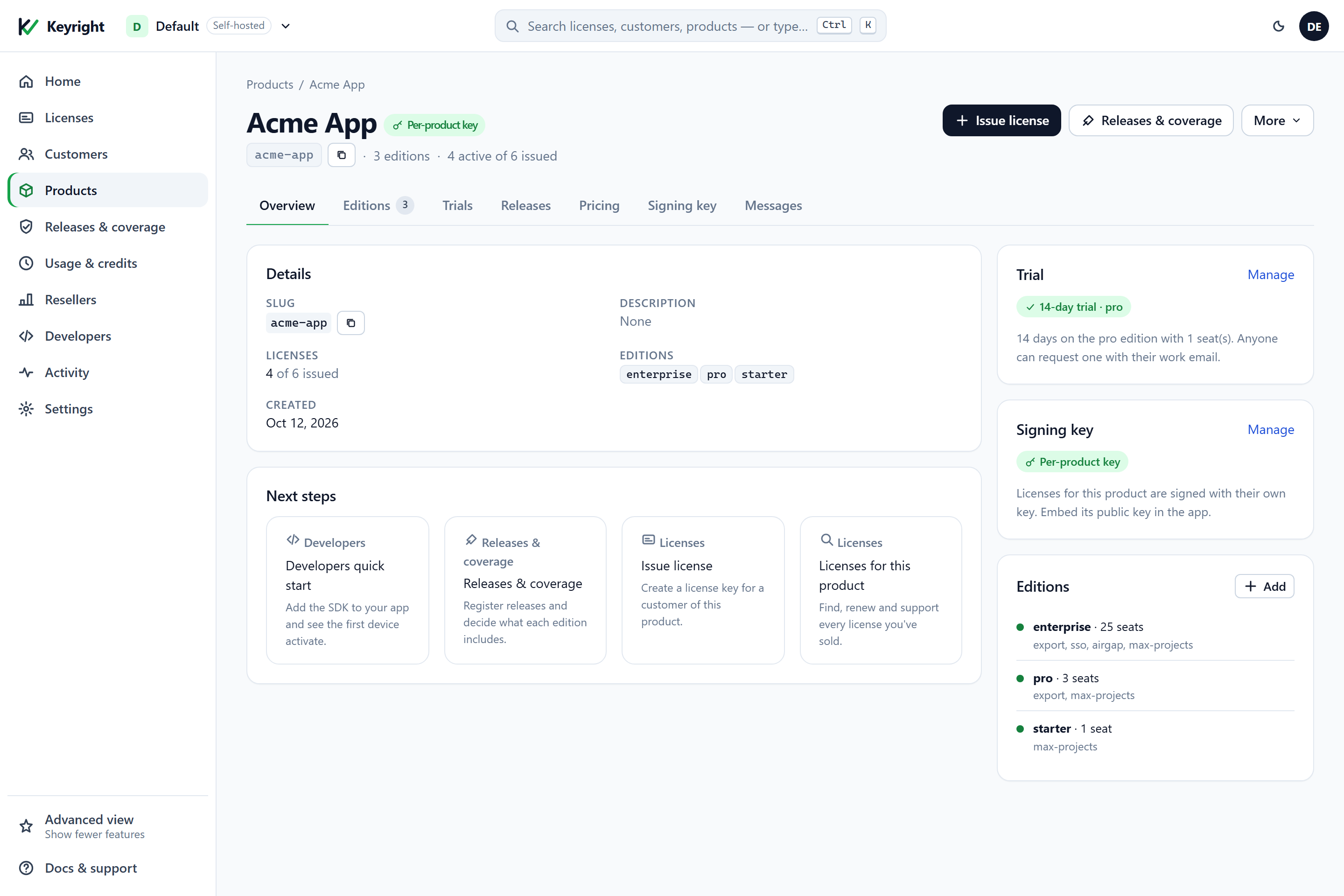
starter gets max-projects, pro adds export, and enterprise adds sso and airgap — and every license issued from an edition inherits those flags.In the dashboard: Products → your product → Editions → Add edition (or edit an existing one), and fill in the entitlements — a boolean flag like export, or a numeric limit like max-projects. Over the API it’s one call:
# define an edition with its entitlement template
curl -X POST $BASE/admin/products/acme-app/tiers -H "X-Admin-Token: $TOKEN" -H "content-type: application/json" \
  -d '{"name":"pro","seats":3,"entitlements":{"export":"true","max-projects":"10"}}'

# a higher edition that adds a flag and lifts the limit
curl -X POST $BASE/admin/products/acme-app/tiers -H "X-Admin-Token: $TOKEN" -H "content-type: application/json" \
  -d '{"name":"enterprise","seats":25,"entitlements":{"export":"true","sso":"true","max-projects":"unlimited"}}'
Entitlement values are strings on the wire: "true"/"false" for a flag, an integer or the literal "unlimited" for a limit. When you issue a license from that edition, the template is applied automatically — the entitlement map shows up on the license (GET /admin/licenses/{id} returns an entitlements object) and inside the signed lease the customer’s app verifies:
# issue a pro license — it inherits pro's entitlements
curl -X POST $BASE/admin/licenses -H "X-Admin-Token: $TOKEN" -H "content-type: application/json" \
  -d '{"licensee":"Acme Inc.","product":"acme-app","tier":"pro","seats":3,"email":"owner@acme.com"}'
One customer who needs something different gets a per-license override at issue: pass an explicit entitlements map in the POST /admin/licenses body (the dashboard’s Issue license drawer exposes the same thing under its advanced options), so you can grant, say, sso to a single Pro account without inventing a new edition. The override is baked into that one license’s signed payload exactly like a template flag.
Entitlements are snapshotted and signed when the license is issued — there is no “edit the entitlements of a live key” call, and re-posting /admin/licenses with an existing id is rejected as a duplicate. To change what an already-issued key unlocks, issue the customer a new license (with the entitlements you want, or from an updated edition) and have them activate it; the old key can be revoked once they switch. Editing an edition’s template changes only the licenses issued after the edit.
In your code
Your app embeds only the public key and reads entitlements off the validated license — offline, no server call (activation/Validate() already delivered and cached the signed lease). The details of initializing the client are in the .NET SDK guide; here is just the gating, in every SDK and over raw HTTP.
The same entitlements you read in code are exactly what the dashboard shows on a license — the flags baked in at issue:
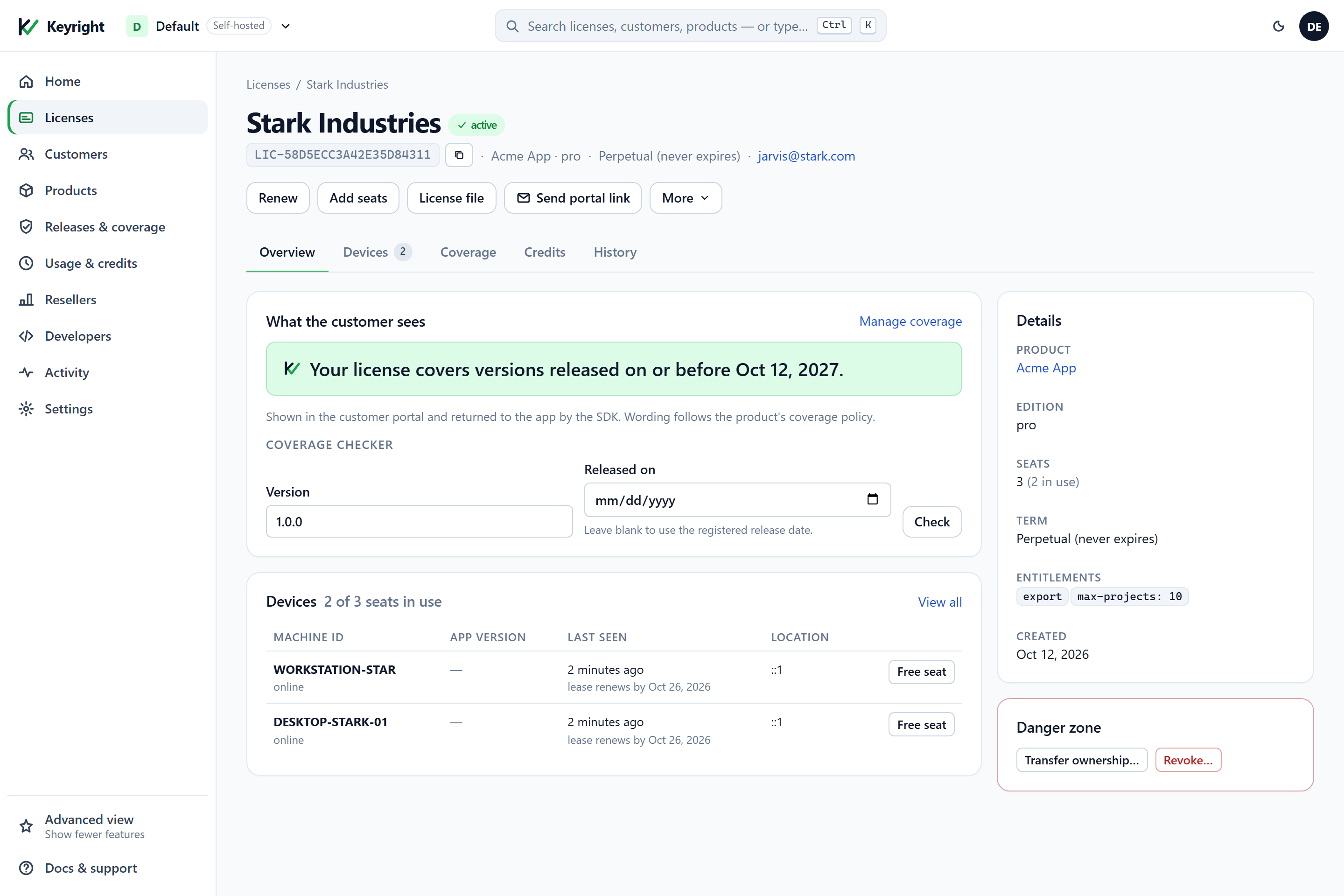
export and max-projects: 10 on a pro key) are signed into its lease at issue — IsEnabled("export") and GetLimit("max-projects", …) read exactly these, offline..NET
using Keyright.Client;

// Edition-level gating: IsPaid is true for any edition above Free; switch on the edition for broad tiers.
LicenseInfo info = License.Validate();          // offline, never throws; failures resolve to Edition.Free
if (info.IsPaid)      ShowPaidChrome();          // trial OR paid — info.IsTrial tells them apart
if (info.Edition == Edition.Enterprise) ShowEnterpriseOnlyPanel();

// Feature-level gating: ask for the entitlement by name — this is the durable way to gate.
if (License.IsEnabled("export"))                 // boolean flag; a missing flag reads as false (fail closed)
    EnableExportCommand();

// Numeric limit: you pass the fail-closed fallback, so an absent/garbled value can never read as "more".
long maxProjects = License.GetLimit("max-projects", fallback: 1);
if (currentProjectCount >= maxProjects)
    PromptToUpgrade();
Node.js
const { info } = license.validate();                        // offline; failures resolve to the 'free' edition
if (info.isPaid) showPaidChrome();                          // trial OR paid
if (info.edition === 'enterprise') showEnterpriseOnlyPanel();

if (info.entitlements.isEnabled('export')) enableExportCommand();   // missing flag -> false
const maxProjects = info.entitlements.getLimit('max-projects', 1);  // 'unlimited' -> a huge number
if (currentProjectCount >= maxProjects) promptToUpgrade();
Python
from keyright import Edition

info = license.validate_info()                       # offline; failures resolve to Edition.FREE
if info.is_paid:
    show_paid_chrome()                               # trial OR paid
if info.edition == Edition.ENTERPRISE:
    show_enterprise_only_panel()

if info.entitlements.is_enabled("export"):           # missing flag -> False
    enable_export_command()
max_projects = info.entitlements.get_limit("max-projects", fallback=1)   # "unlimited" -> very large int
if current_project_count >= max_projects:
    prompt_to_upgrade()
Java
LicenseInfo info = client.validateInfo();            // offline; failures resolve to Edition.FREE
if (info.isPaid()) showPaidChrome();                 // trial OR paid
if (info.edition == Edition.ENTERPRISE) showEnterpriseOnlyPanel();

if (info.entitlements.isEnabled("export")) enableExportCommand();   // missing flag -> false
long maxProjects = info.entitlements.getLimit("max-projects", 1);   // "unlimited" -> EntitlementSet.MAXLONG
if (currentProjectCount >= maxProjects) promptToUpgrade();
Any language (raw HTTP)
# No SDK call — read the flags straight out of the lease you already verified.
# After the lease's signature checks out (see "Verify the lease offline"), the signed
# lease JSON carries an "entitlements" object; the flag is part of the signed payload (the
# |ent= segment), so a lease that verifies is one whose entitlements you can trust:
#
#   "entitlements": { "export": "true", "max-projects": "10" }
#
# export enabled  = entitlements["export"] is "true"/"1"/"yes"   (absent -> off, fail closed)
# project limit   = int(entitlements["max-projects"])           ("unlimited" -> no cap; absent -> your fallback)
IsEnabled and GetLimit each validate on the spot and fail closed: a missing flag is disabled, a missing or unparseable limit returns your fallback, and "unlimited" reads as long.MaxValue. When you check several entitlements together, validate once and reuse the result:
LicenseInfo info = License.Validate();
bool canExport = info.Entitlements.IsEnabled("export");
long maxSeats  = info.Entitlements.GetLimit("max-seats", 1);
What LicenseInfo exposes for your UI: IsPaid, Edition, IsTrial, StatusBadge (e.g. “Enterprise” / “Pro Trial”), ExpiryUtc, DaysRemaining, Status and a human-facing Message, plus the Entitlements map itself. Gate the feature on the entitlement; use the edition only for coarse chrome.
Raw-HTTP consumers (Go, Rust, PHP…) read the same entitlements from the verified lease: the signed lease JSON carries an entitlements object, and after you verify the lease’s signature you read flags straight out of it. The entitlements are part of the canonical signed payload (the |ent= segment), so a lease that verifies is one whose entitlements you can trust — the full verification recipe is in Use the HTTP API directly.
Changing what an existing customer gets. Editing an edition’s template changes future licenses only — issued licenses keep the entitlements they were signed with, the same snapshot rule coverage uses. To change a license already in the field you have two confirmed paths: add a per-license override (reissue the license from its dashboard page / POST /admin/licenses with the same id), which re-signs it with the new entitlement map and the customer picks it up on the next lease refresh; or, for a whole edition, change the template and reissue affected licenses. A renew extends the term and re-signs, but is scoped to expiry and seats — reissue is the path when the entitlement set itself must change.
Cloud vs Self-hosted
Entitlements work identically in both modes — same template, same SDK calls, same signed payload. The only differences are the usual ones:
$BASEand$TOKEN. Cloud:https://keyright.delta1labs.comwith a team/session token. Self-hosted: your instance URL with yourKEYRIGHT_ADMIN_TOKEN.- Which entitlements you can hand out depends on your own plan (Cloud) or self-hosted edition — entitlement names are yours to invent and mean whatever your app decides; there is no fixed vocabulary. (Not to be confused with the entitlements on the instance’s own self-license, which gate Keyright features like SSO — see Licensing & editions.)
Verify
- Define a
proedition with{"export":"true"}and afree-less product; issue yourself aprokey. - Before activation,
Validate()returnsFreeandIsEnabled("export")isfalse— the command stays hidden. - Activate the key. The badge flips to Pro,
IsEnabled("export")returnstrue, and the export command appears. Disconnect the network and restart — the decision still holds from the cached lease, proving it’s offline. - Add
"sso":"true"to the edition (or pass it as a per-license override) and issue a new license from it; activate that key and refresh — the new flag appears with no new app build. (Entitlements are fixed on the original key at issue, so this is a new key, not an edit of the old one.) - Hand-edit a cached lease file (flip a flag) and revalidate: the signature fails and the app drops to
Free, confirming the gate can’t be forged.
See also
- .NET SDK integration — the full client walkthrough these snippets build on.
- Use the HTTP API directly — reading entitlements from a verified lease in any language.
- Security & the lease model — why a signed entitlement can’t be forged or edited.
- Revoke, renew & handle expiry — the other things you change on a live license.
- Credits & metered usage — gate consumption instead of a capability.