Nebula.NET · Features
Every layer of protection, explained
Nebula.NET combines a full stack of transforms to raise the cost of reverse-engineering your .NET code. Grouped by what they do — obfuscation, hardening, and the build tooling around them — here's each one, why it matters, and where to learn more.
The pipeline
One pass, applied to your compiled output
Nebula works on assemblies, not source. Every feature below is a stage or an option in this single, verified pass.
Obfuscation
Obfuscation & code transformation
The core job: make the compiled code unreadable and its logic unrecoverable. These transforms attack names, structure and secrets — and the toughest of them move logic off IL entirely.
Identifier renaming
Types, methods, fields and parameters are renamed to short, meaningless identifiers, so a decompiler shows a.b(c) instead of PricingEngine.CalculateDiscount(order). Namespaces collapse and the metadata that once documented your design is gone. You can preserve your public API (for libraries) while still renaming everything internal, and reflection- and serialization-referenced names are detected and kept automatically.
Control-flow flattening
The real win against decompilers. Nebula rewrites each method into a dispatcher-driven state machine — a while(true){ switch(state) } loop — so the original if/for/try structure is genuinely destroyed rather than reordered. It works on every method shape, including big try/catch blocks, and the Enterprise aggressive tier even breaks up straight-line code. Every transform is verified to run identically to your original.
Code virtualization
The strongest protection — an Enterprise feature. Your most sensitive methods are compiled to a custom bytecode run by a small embedded virtual machine, so the logic no longer exists as IL: a decompiler shows only a call into the VM. To recover the method an attacker must first reverse-engineer the VM itself. Ideal for licence checks, key math and proprietary algorithms; the shipped runtime is .NET Standard 2.0, so it works on every .NET target including .NET Framework.
Learn more in the docsReference (proxy-call) obfuscation
Calls are routed through injected, unbranded proxy methods, so a decompiler — and automated call-graph analysis — can no longer see which external or BCL method a site actually invokes. Combined with the layers above, it stops automated deobfuscators like de4dot from reconstructing your program.
Learn more in the docsString encryption
Literal strings — messages, SQL, URLs, keys, the text that gives your logic away — are encrypted with a fresh per-build key and decrypted at runtime through an inlined, unbranded routine. A reverse-engineer scanning for a giveaway string finds nothing. Select every string, or just the sensitive ones.
Learn more in the docsWhole-method encryption
For your most sensitive methods, the IL body itself is encrypted and only decrypted in memory when the method is first called — so the method’s instructions aren’t present in the shipped assembly at all until runtime. The IL is kept encrypted at rest in memory and decrypted into a short-lived buffer that is scrubbed immediately after use, so a memory dump has no persistent plaintext IL to scrape (anti-dump hardening).
Learn more in the docsConstant masking
The numeric literals in your code are often the logic itself — a licensing threshold, a protocol opcode, a feature-flag bitmask, a magic header. Nebula masks integer constant loads with a per-build XOR key resolved at runtime, so the tell-tale value no longer appears as a plain literal in a decompile. This is lightweight masking, not cryptography — its job is to break the eye-catching constant and defeat naive constant-scanning, and it pairs with string encryption to close the other half of the literal leak.
Learn more in the docsHardening
Anti-analysis & hardening
Obfuscation slows a reader down; hardening stops the attacks that bypass reading altogether — patching the binary, attaching a debugger, or lifting embedded resources.
Anti-tamper
A load-time integrity check detects if the assembly has been modified (patched to skip a licence check, for example) and reacts the way you choose — throw, exit, or call your own handler. It defeats the most common attack: editing the binary to bypass your protection.
Learn more in the docsAnti-debug
Detects an attached managed debugger (Debugger.IsAttached / Debugger.IsLogging()) at module load and reacts on your terms, making it harder to step through the protected code. It is a load-time check — pair it with anti-tamper and the profiler/patcher detection below for live-analysis resistance.
Profiler & patcher detection
Beyond a debugger, Nebula can detect a CLR profiler hook (the environment a tracing/instrumentation tool sets) and known runtime-patching frameworks — Harmony and MonoMod.RuntimeDetour — the method-detour technique cheats and licence bypasses use to rewrite method bodies in memory, where on-disk anti-tamper can’t see them. A continuous mode keeps watching after startup (via AppDomain.AssemblyLoad and re-checks at your licensing gates) so a patcher attached late is still caught. Reacts on your terms; off by default so it never hinders your own profiling.
Auto-protect licensing checks
Using Keyright (or any licensing SDK)? Turn this on and Nebula automatically finds the methods that call your licensing SDK and targets them for the strongest protection your edition applies — force-including them in virtualization and control-flow flattening, and never letting them be excluded. The code that enforces your license is the code attackers hunt for; this makes sure it is always your hardest-to-read code, without you naming a single method.
Learn more in the docsExpiry / time-bomb
Ship a build that stops working after a set date — for time-limited betas, evaluations or embargoed releases. A load-time guard reacts once the date passes (throw, exit, or your own handler). Pair it with anti-tamper so the check can’t be trivially stripped.
Learn more in the docsTamper telemetry (report-home)
Built-in telemetry so you learn when a protected copy is being attacked in the field. When any guard fires — anti-tamper, anti-debug, profiler/patcher detection or expiry — Nebula also POSTs a minimal event to your own endpoint before it reacts, with no callback to write. The send is bounded and self-swallowing, so it can never block or crash the app; only the event name leaves (no source, no code), and it goes to your URL, never to us.
Learn more in the docsResource & metadata hardening
Embedded resources can be encrypted, and compile-time-only metadata that leaks intent is stripped or obscured — removing another layer a decompiler relies on.
Learn more in the docsPer-customer watermarking
Embed a hidden, unique identifier in each customer’s build. If a protected binary leaks or is cracked, read the mark back to trace it to the exact customer it was issued to — a deterrent and a forensic tool.
Learn more in the docsBuild & operations
Build, integration & operations
Protection that fits real products and real teams: whole-solution builds, signed output, CI automation, and the tooling to still debug production once your code is renamed.
Authenticode & strong-name signing
Because obfuscation rewrites the assembly, signing has to happen after — so Nebula does it for you: re-apply your strong name and Authenticode-sign the protected output (with timestamping) as part of the pipeline.
Learn more in the docsCross-assembly protection
Obfuscate a whole product at once. Nebula renames public members consistently across all your assemblies, so references between them stay valid — protection that spans your entire codebase, not one DLL at a time.
Learn more in the docsBlazor WebAssembly protection
Blazor WASM ships your real assemblies to the browser — the highest-exposure .NET target. The nebula blazor command obfuscates a published app and repairs the blazor.boot.json integrity hashes and pre-compressed copies, so the protected app still loads. Most obfuscators can’t do this.
Stack-trace de-obfuscation
Each build produces a symbol map that only you hold. Feed a renamed production stack trace back through Nebula to translate it into original names — so protecting your code doesn’t cost you the ability to diagnose crashes.
Learn more in the docsCLI, desktop app & CI
Run it however you like: a point-and-click desktop app to explore and select, a config-driven CLI for scripts, or MSBuild/CI integration that protects automatically on the build server while developer builds stay untouched. No source-code dependency — Nebula transforms compiled output, so nothing Nebula-specific lives in your projects. The CLI is a cross-platform dotnet tool, so it runs on Linux and macOS build agents as well as Windows.
Attribute-based configuration
Prefer marking what to keep in code rather than a config file? Nebula honors the standard [Obfuscation] attribute on types and members, and [assembly: ObfuscateAssembly(false)] to protect a library while preserving its public API. Reflection-, serialization- and Unity-referenced names are detected and preserved automatically.
Consistent renaming across releases
Seed a build from the previous release’s symbol map and unchanged members keep their previous obfuscated names. Essential when renamed names are part of a contract that must survive an update — plugin surfaces, serialized data that must still deserialize, or patches against an earlier build.
Learn more in the docsPer-build protection report
Every run emits a report of exactly what was renamed, flattened and encrypted, plus a machine-readable --json run summary you can archive as a build artifact — so protection is auditable and you can diff it build-to-build.
Compatibility
Every language, framework and app model
One tool for the whole platform — C#, F# and VB.NET; from the .NET Framework apps you've shipped for years to the newest cross-platform runtime, browser-hosted WebAssembly, MAUI/Xamarin mobile and Unity (Mono) game code. The virtualization runtime targets .NET Standard 2.0, so protected code loads everywhere. For AOT and IL2CPP pipelines, Nebula protects the managed IL before the ahead-of-time step.
The desktop app and installer are Windows; the nebula CLI is a cross-platform dotnet tool that also runs on Linux and macOS build agents. Compare Free, Pro & Enterprise →
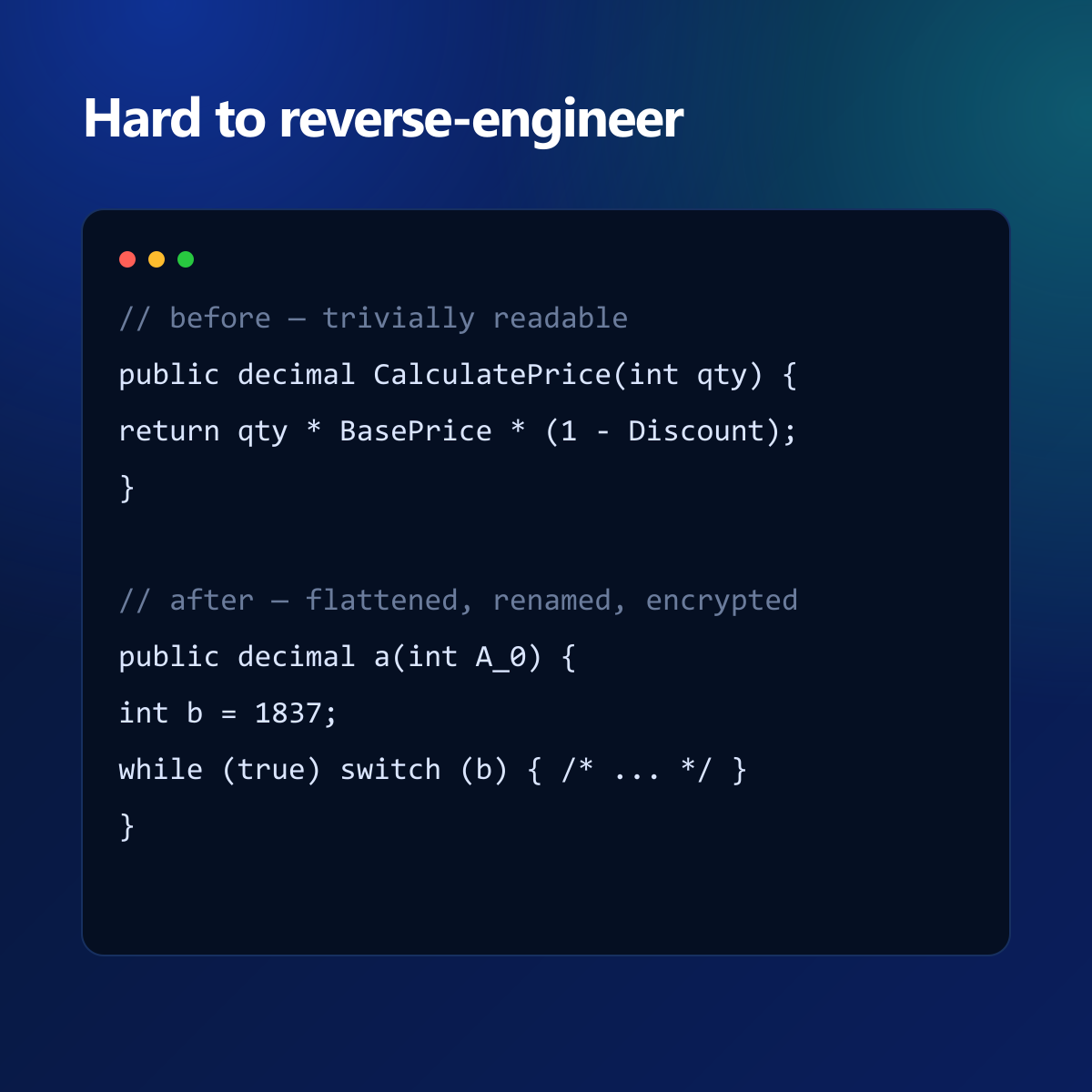
Before and after: readable C# becomes flattened, renamed and encrypted.
Try every feature free
The Free edition includes the full toolset (with light caps). Unlock everything with a license.
On Linux, macOS or CI? Install the cross-platform tool: dotnet tool install -g Delta1Labs.Nebula.Tool — see Linux, macOS & CI.