Use cases
Sell upgrades & control versions
Decide which releases of your product each license covers — lifetime updates, a support window, one major version, upgrade protection, subscriptions with or without a perpetual fallback — and enforce it in your app or on your own download page, with no reactivation, no key re-entry, and full offline support.
Goal
Sell updates the way your business actually works — “every 2.x release”, “any version released in the year after purchase”, “whatever ships while the subscription is active” — and have your app (and your own download page) get a yes/no answer for any version. This is release coverage: Keyright records what each license covers, signs it, delivers it to the customer’s machine alongside the lease, and decides eligibility, without ever asking a customer to re-enter a key or reactivate, and without taking a running install down.
Keyright is a coverage oracle: it decides whether a license covers a release. It never hosts downloads, update feeds or release listings — you keep running your own updater and download page, and ask Keyright whether a given customer may have a given version.
When to use it
- Use this if you charge for upgrades, run a maintenance window, sell per-major versions, or run a desktop subscription — anything where “owning the software” and “being entitled to this build” are different questions.
- Use this if you want to gate your own download page or updater per customer, online or air-gapped, from a single signed source of truth.
- Don’t use this just to stop an expired license from running — that’s the license’s own expiry (see Activate, deactivate & move seats). Coverage adds the release-date / version dimension on top.
Release coverage is part of the top plan on the hosted service (Scale and Enterprise) and of self-hosted licenses that include the coverage feature. Lower plans see the feature locked in the dashboard with an upgrade prompt. The SDK is identical across plans: a license without coverage simply reads as not configured and runs every version.
How it works
Every license carries a set of coverage terms. A term is a version range (2.0.0 ≤ v < 3.0.0), a date window (anything released between two calendar dates), or both — optionally limited to a release channel (stable by default; betas need an explicit beta term). A release is covered when any term matches its version and its entitlement date (normally the date it was released).
Three properties make this safe to enforce:
- Snapshot, not live. When you issue a license, the edition’s coverage policy expands into terms that are stored on that license. Changing the policy later never changes what existing customers bought; you apply new terms to existing licenses with an explicit, previewed action (see Applying a policy to existing customers).
- Terms only grow. The terms are an append-only record. Renewals and upgrades add terms; a term can be removed by support, but nothing a customer can run today is ever silently taken away by a policy edit.
- Signed and offline. Coverage travels as a separately signed coverage block bound to the license and product. The app verifies it with the same public key it already embeds, caches it, and decides coverage locally — online, offline or air-gapped. A monotonic sequence number stops an older block from being replayed to restore lapsed coverage, and a block that is missing or tampered with is never treated as “covered”.
Two more ideas you will meet throughout:
- Entitlement date vs. release date. Coverage is judged against a release’s entitlement date, which defaults to its release date but can be set separately. That is how a security hotfix shipped after a customer’s support window ended can still be covered for them: date the hotfix as its base release.
- The release registry is optional. Enforcement works entirely from the build’s own embedded version and entitlement date. If you also register releases (from CI or the dashboard), Keyright can tell customers the newest version they can use, preview how many customers a release is covered for, and date hotfixes for you.
Which coverage model fits
Six plain-language presets cover the common businesses. Pick one per edition; it expands into terms on every license you issue from then on.
| Preset | What the customer gets | Typical use |
|---|---|---|
| Lifetime updates | Every version, forever. | A one-time purchase that promises free upgrades. |
| Updates for a period | Any version released within N months of purchase; the copy keeps working forever. | Classic “one year of updates” perpetual licensing. |
| One major version | Every release of one major line (e.g. all of 2.x), forever. | Per-major upgrade pricing. |
| One major + upgrade protection | One major forever, plus anything released within N months — including the next major if it ships in time. | Per-major pricing with a maintenance plan. |
| Subscription | Everything released while the subscription is active; nothing after it lapses. | SaaS-style desktop licensing. |
| Subscription with fallback | Like Subscription, but after a lapse the customer keeps the versions released while they paid. | Subscriptions that must never strand a customer. |
Anything else — a single pinned version, a per-minor line, a custom window — is a custom term you add to a license from the Advanced section of its Coverage tab (or the grants API below).
Lifetime updates
Scenario. You sell a one-off key and promise free upgrades for life (or you simply don’t gate updates and want the portal to say so). Nothing ever expires.
Terms. One open term: every version, every date. What the customer reads (portal, SDK, API): “Your license covers every version.” — an uncovered state can never occur.
Configure. Edition policy → Lifetime updates (no questions), or on one license Change coverage… → Lifetime updates. API: {"preset":"lifetime"}.
Updates for a period
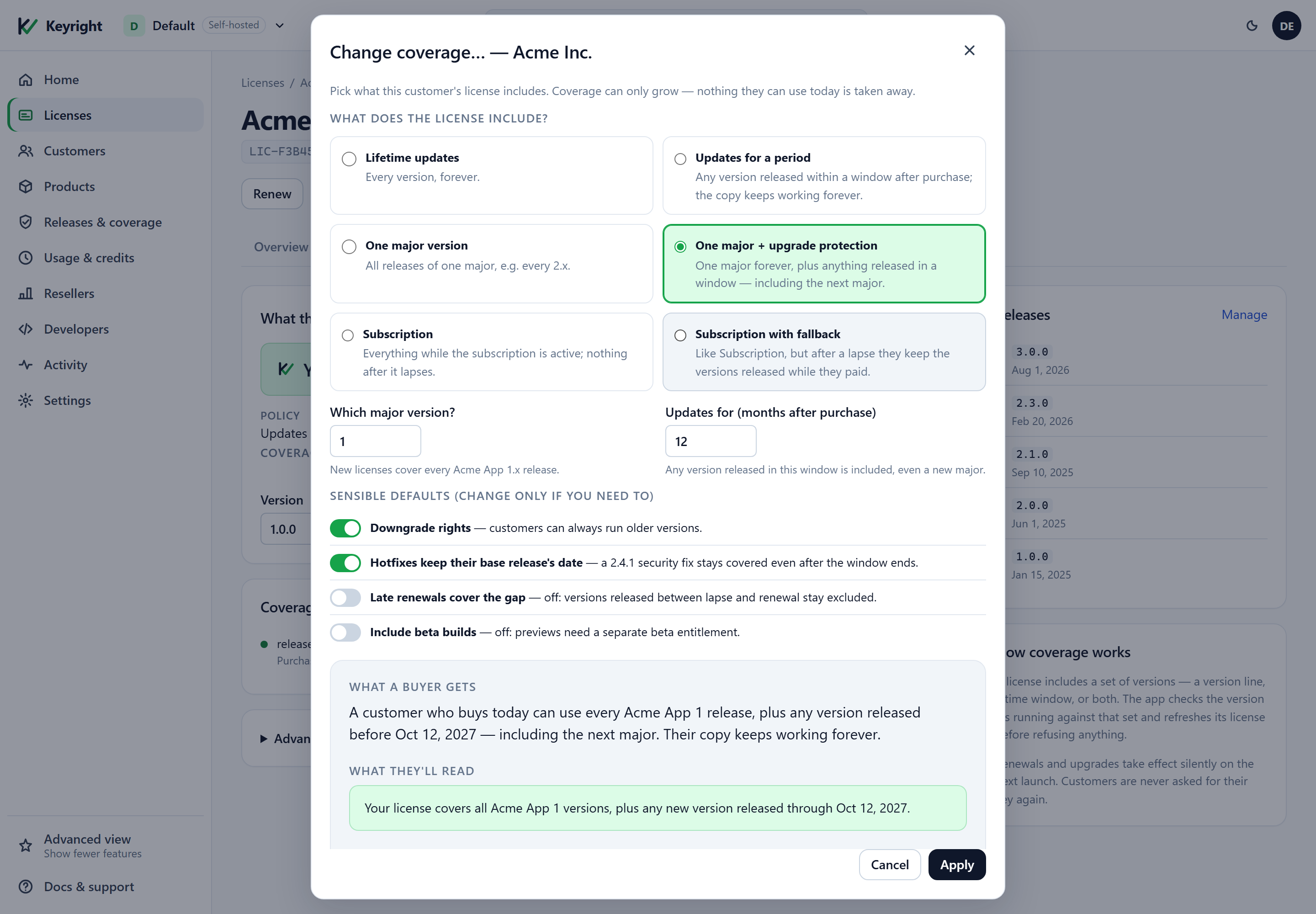
Scenario. A perpetual license with twelve months of updates. The customer keeps their copy forever and can install anything released inside the window — including a new major if it ships in time. A version released after the window is “not covered — window lapsed”, so the app offers Renew.
Terms. One date window from the purchase date to purchase + N months, any version. Renewing appends another window (contiguous, or with a gap you can choose to leave uncovered). Customer reads: “Your license covers any version released through 9 Oct 2027.”
Configure. Edition policy → Updates for a period → Updates for (months after purchase). API: {"preset":"updatesForPeriod","periodMonths":12}.
One major version
Scenario. Per-major pricing: a 2.x license runs every 2.x release ever made, including ones shipped years later, but not 3.0. A 3.0 build is “not covered — outside the version range”, so the app offers Upgrade. Older lines (1.x) are always allowed — downgrade rights are built in.
Terms. One version range [major.0.0, major+1.0.0), any date. Customer reads: “Your license covers all Acme Studio 2 versions.”
Configure. Edition policy → One major version → Which major version?. API: {"preset":"oneMajor","major":2}. When your edition sells “the current major”, bump the policy’s major when you ship the next one — existing customers keep the line they bought.
One major + upgrade protection
Scenario. Per-major pricing plus a maintenance plan: the customer owns 2.x forever and gets anything released in the next N months — so if 3.0 ships inside the window they get it, along with any 3.x patch released before the window closes. A 3.x release dated after the window is outside both terms (→ Renew, since it is the window that lapsed). This is the most common “paid upgrades with a safety net” model.
Terms. Two terms — the major line, and a date window from purchase to purchase + N months. Customer reads: “Your license covers all Acme Studio 2 versions, plus any version released through 9 Oct 2027.”
Configure. Edition policy → One major + upgrade protection → major + months. API: {"preset":"oneMajorPlusUpgradeProtection","major":2,"periodMonths":12}.
Subscription
Scenario. The customer may use any version released while they pay. The license itself normally carries an expiry that matches the billing period (so the app stops when the subscription ends); coverage adds the release-date dimension so that, for example, a customer who downgrades to a cheaper plan or whose term is extended without a new key still gets exactly the versions they are entitled to.
Terms. One date window from issue to issue + N months. Each renewal appends the next window. After a lapse, releases dated after the window are “window lapsed” → Renew. Customer reads: “Your license covers any version released through 9 Oct 2027.”
Configure. Edition policy → Subscription → Term (months). API: {"preset":"subscription","periodMonths":12}.
Subscription with fallback
Scenario. A subscription that never strands a customer: when they stop paying, they keep the versions released while they paid (a “perpetual fallback”), and only releases after the lapse need a renewal.
Terms. At issue this preset expands exactly like Subscription — one window for the paid term. The fallback is simply that window not being revoked at lapse: because terms only grow, a customer whose subscription ends still holds a term covering everything released during it. When you process a lapse in your billing flow, do not revoke the coverage term; if you also let the license itself expire, the app follows your normal expiry behaviour. To record the lapse explicitly, add a custom term with reason Fallback ending at the lapse date (see custom terms).
Configure. Edition policy → Subscription with fallback → Term (months). API: {"preset":"subscriptionWithFallback","periodMonths":12}.
Betas and early access
A term without a channel covers stable releases only. To let a customer run beta builds, give them a term on the beta channel (toggle Include beta builds on the policy, or set "channel":"beta" on a custom term) and build your previews with KeyrightCoverageChannel=beta. Keyright covers betas; it never expires builds — if you want a preview to self-expire, bake KeyrightCoverageBuildExpiry into it and check CoverageBuildInfo.Current.BuildExpiryUtc in your own startup code.
Setting it up in the dashboard
Everything below lives under Releases & coverage (the Intermediate and Advanced views of the dashboard; it also appears in the Basic view as soon as you register a release or save a policy — see Admin dashboard → Experience level).
1. Register releases (optional, recommended)
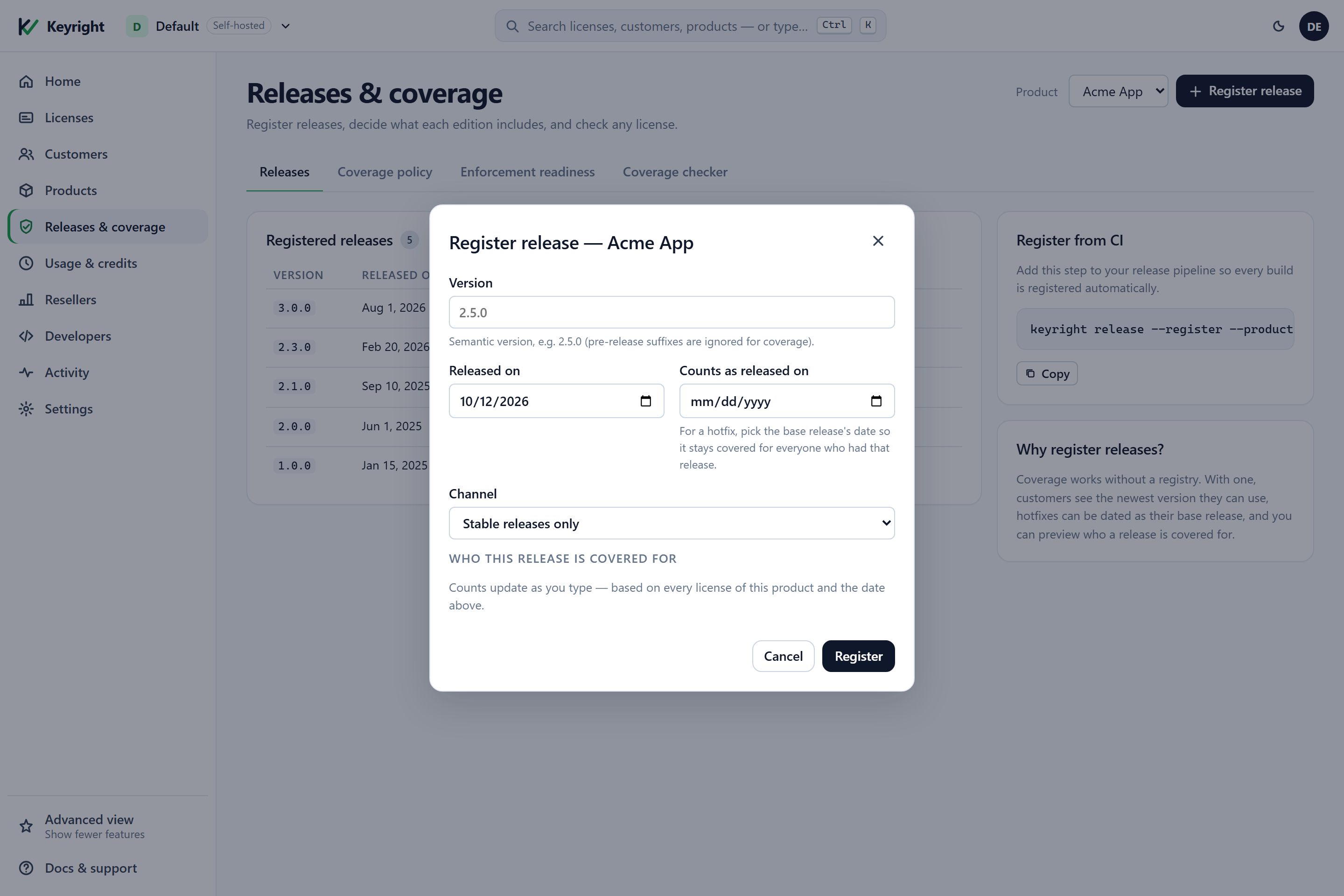
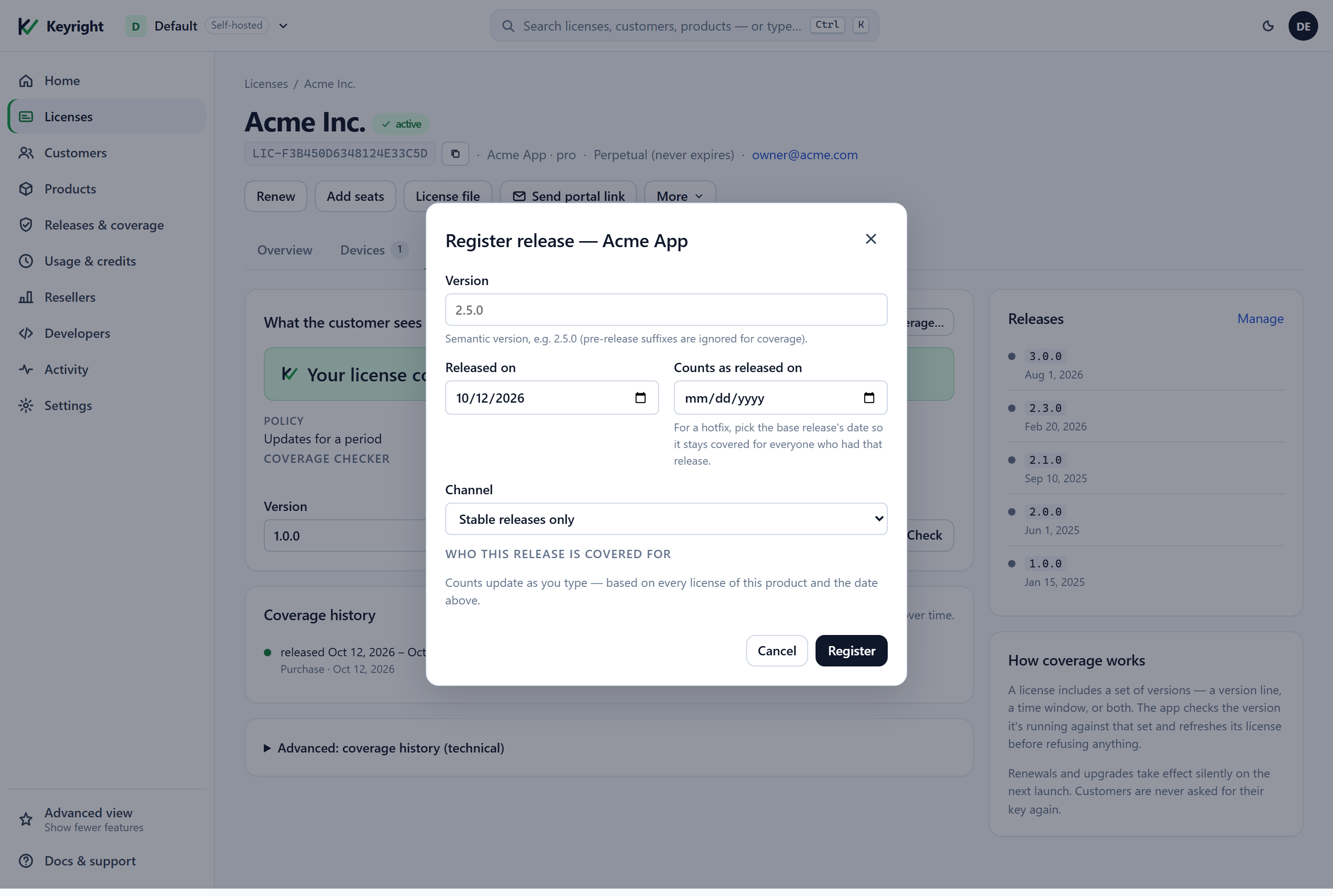
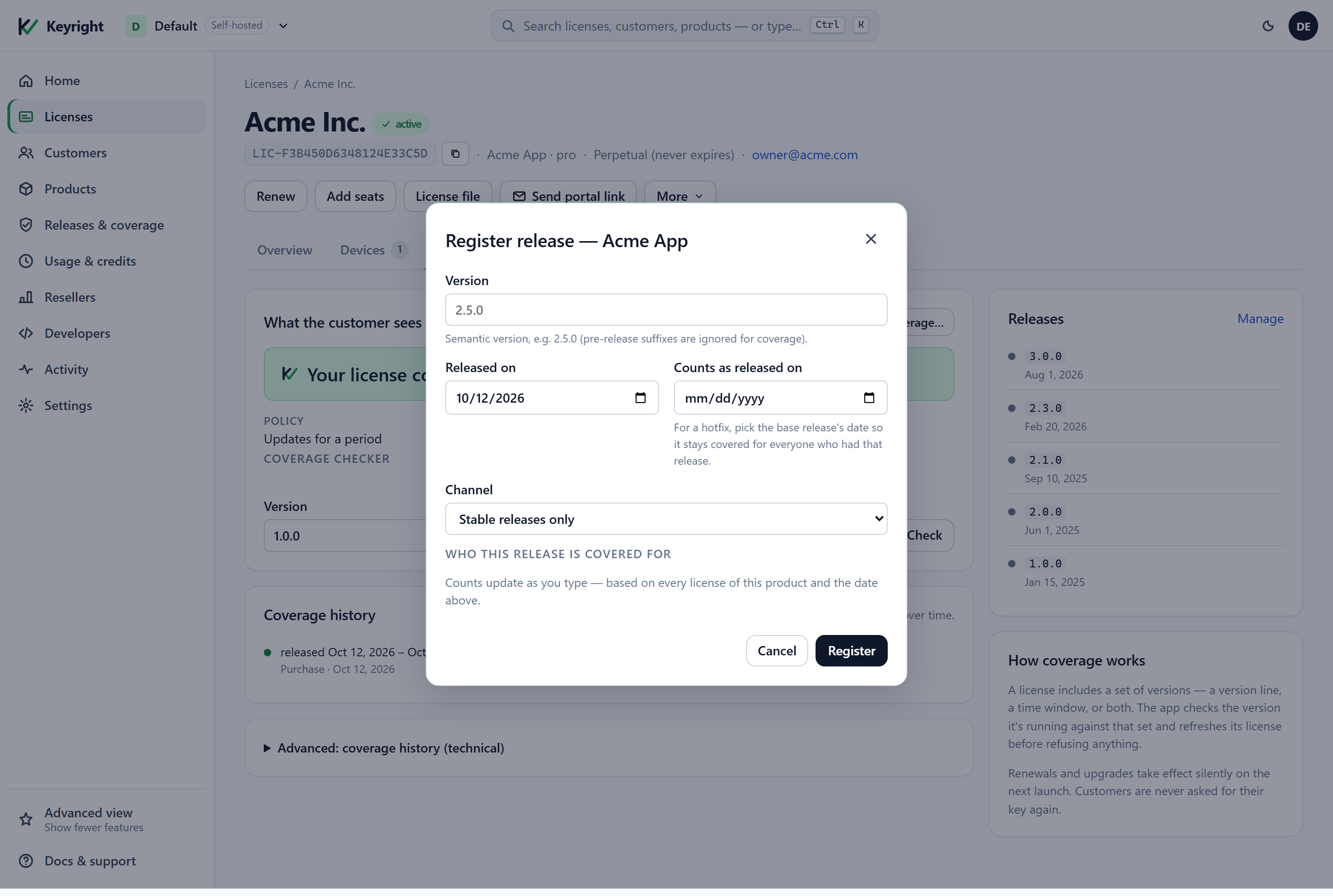
Registering a release records its version, release date, an optional separate entitlement date and its channel. Nothing else — no files or URLs. With a registry, customers see the newest version they can use, the dashboard previews who each release is covered for, and the coverage checker can date a version for you.
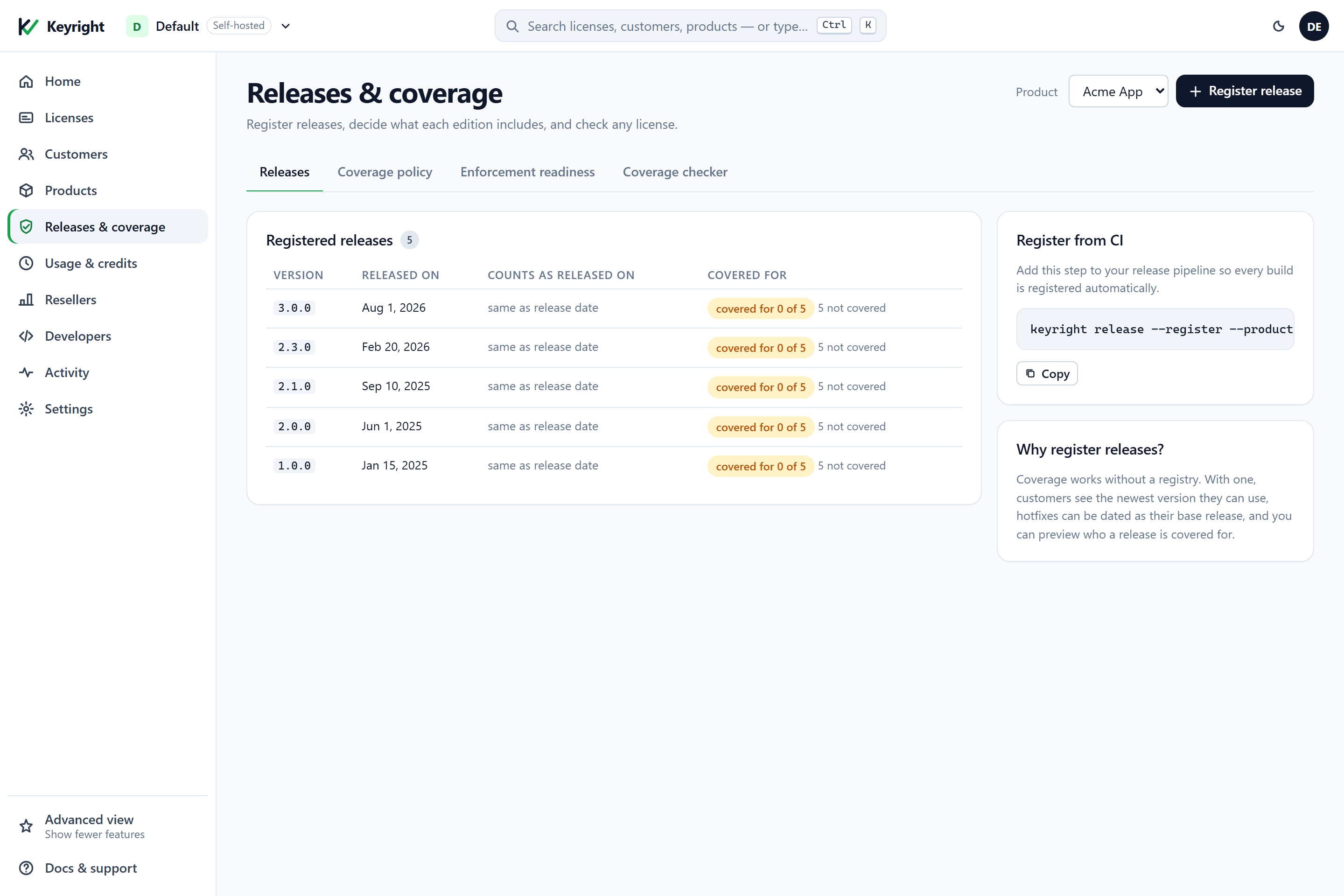
From CI, register every release as it ships:
# KEYRIGHT_URL and KEYRIGHT_ADMIN_TOKEN can also be passed as --url / --admin-token
keyright release --register --product acme-studio --version 2.4.0 --release-date 2026-10-01

# a hotfix that must stay covered for everyone who had 2.3.0: date it as the base release
keyright release --register --product acme-studio --version 2.3.1 --release-date 2026-09-30 --entitlement-date 2026-07-02

# a preview build on the beta channel
keyright release --register --product acme-studio --version 3.0.0 --release-date 2026-10-08 --channel beta
Or over the API (idempotent per product + version):
curl -X POST $BASE/admin/products/acme-studio/releases -H "X-Admin-Token: $TOKEN" -H "content-type: application/json" \
  -d '{"version":"2.3.1","releaseDate":"2026-09-30","entitlementDate":"2026-07-02","channel":"stable"}'
# -> { "product":"acme-studio", "version":"2.3.1", "releaseDate":"2026-09-30", "entitlementDate":"2026-07-02", "channel":"stable" }

# how many licenses would cover a release, before you ship it
curl "$BASE/admin/products/acme-studio/releases/preview?version=2.5.0&on=2026-10-09" -H "X-Admin-Token: $TOKEN"
# -> { "product":"acme-studio", "version":"2.5.0", "covered":4, "notCovered":1, "notConfigured":0, "total":5 }
The Register release dialog shows the same preview live as you type.
2. Give each edition a coverage policy
Open Releases & coverage → Coverage policy, pick the edition (tier), choose a preset, answer its one or two questions, and Save policy. The side panel previews, in plain English, what a buyer gets, the sentence they will read, and the message they would see if they opened a version outside their terms.
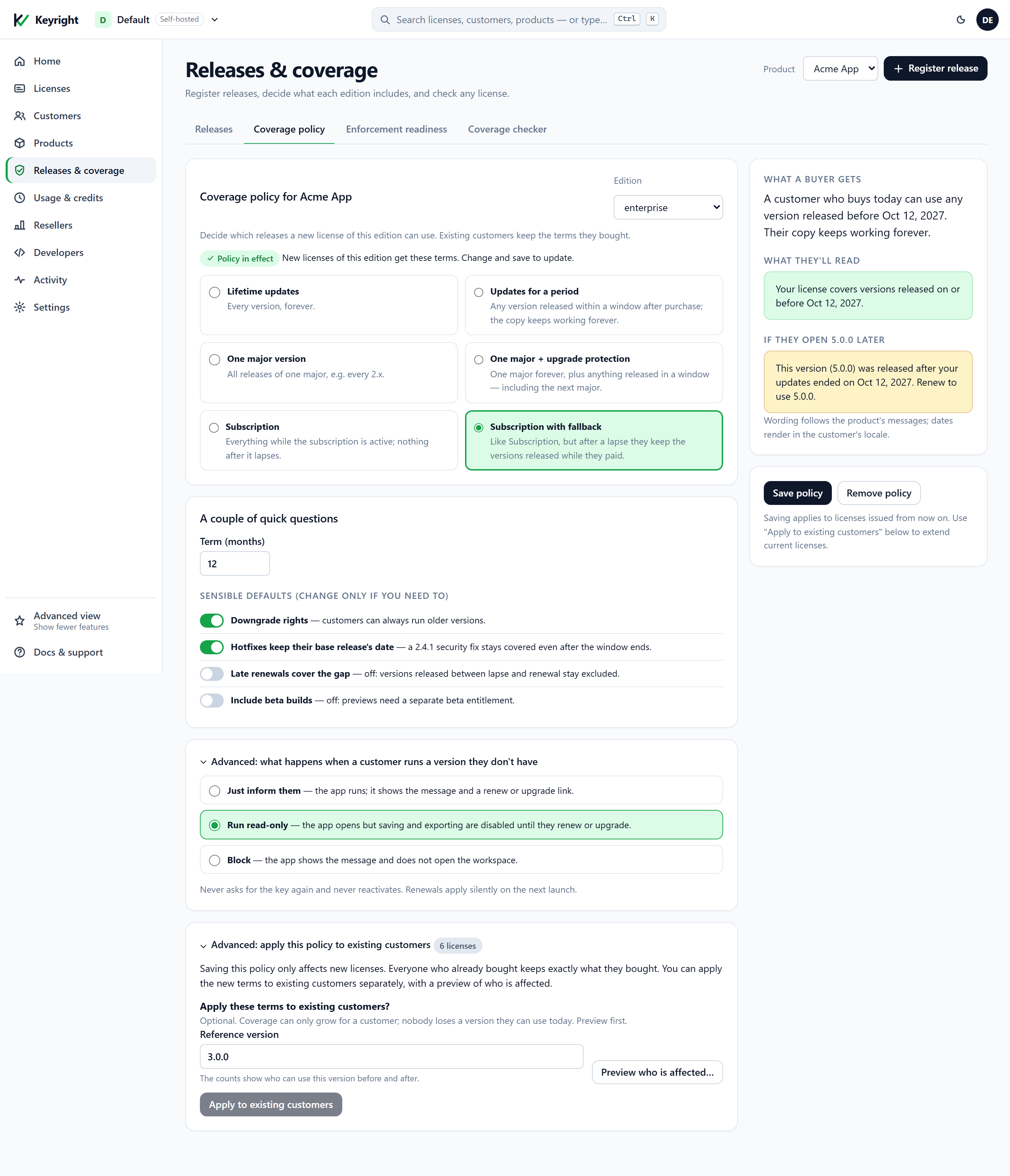
What each control means:
| Control | Meaning |
|---|---|
| Edition | Policies are per edition. New licenses of this edition get these terms at issue; other editions are untouched. |
| Preset | One of the six models above. |
| Which major version? | For the two “one major” presets: the line the license covers (2 → every 2.x). |
| Updates for / Term (months) | For the date-based presets: the window length, counted from the day each license is issued. |
| Downgrade rights | Documents that older versions are always allowed — a version line already includes everything below it, and a window includes everything released before it. |
| Hotfixes keep their base release’s date | Documents the entitlement-date rule: date a hotfix as its base release when you register it and it stays covered. |
| Late renewals cover the gap | Documents how you renew: a renewal term that starts at the old end date covers the gap; one that starts today leaves the gap uncovered. |
| Include beta builds | Puts the policy’s terms on the beta channel instead of stable-only. |
| Advanced: what happens when a customer runs a version they don’t have | Records the behaviour you have chosen for your app — inform, run read-only, or block. The server returns the decision; your app implements the behaviour (see In your app). |
| Advanced: apply this policy to existing customers | A previewed migration for licenses issued before this policy — see below. |
Saving a policy only affects licenses issued from now on. The same thing over the API — note that an edition upsert replaces the whole edition, so send its seats and features too:
curl -X POST $BASE/admin/products/acme-studio/tiers -H "X-Admin-Token: $TOKEN" -H "content-type: application/json" \
  -d '{"name":"pro","seats":5,"entitlements":{"export":"true"},
       "coveragePolicy":{"preset":"oneMajorPlusUpgradeProtection","major":2,"periodMonths":12}}'

# clear a policy: send an empty preset (omitting coveragePolicy leaves the current one unchanged)
curl -X POST $BASE/admin/products/acme-studio/tiers -H "X-Admin-Token: $TOKEN" -H "content-type: application/json" \
  -d '{"name":"pro","seats":5,"entitlements":{"export":"true"},"coveragePolicy":{"preset":""}}'
preset is one of lifetime, updatesForPeriod, oneMajor, oneMajorPlusUpgradeProtection, subscription, subscriptionWithFallback; major is required by the two “one major” presets and periodMonths by the four date-based ones; channel is optional (beta).
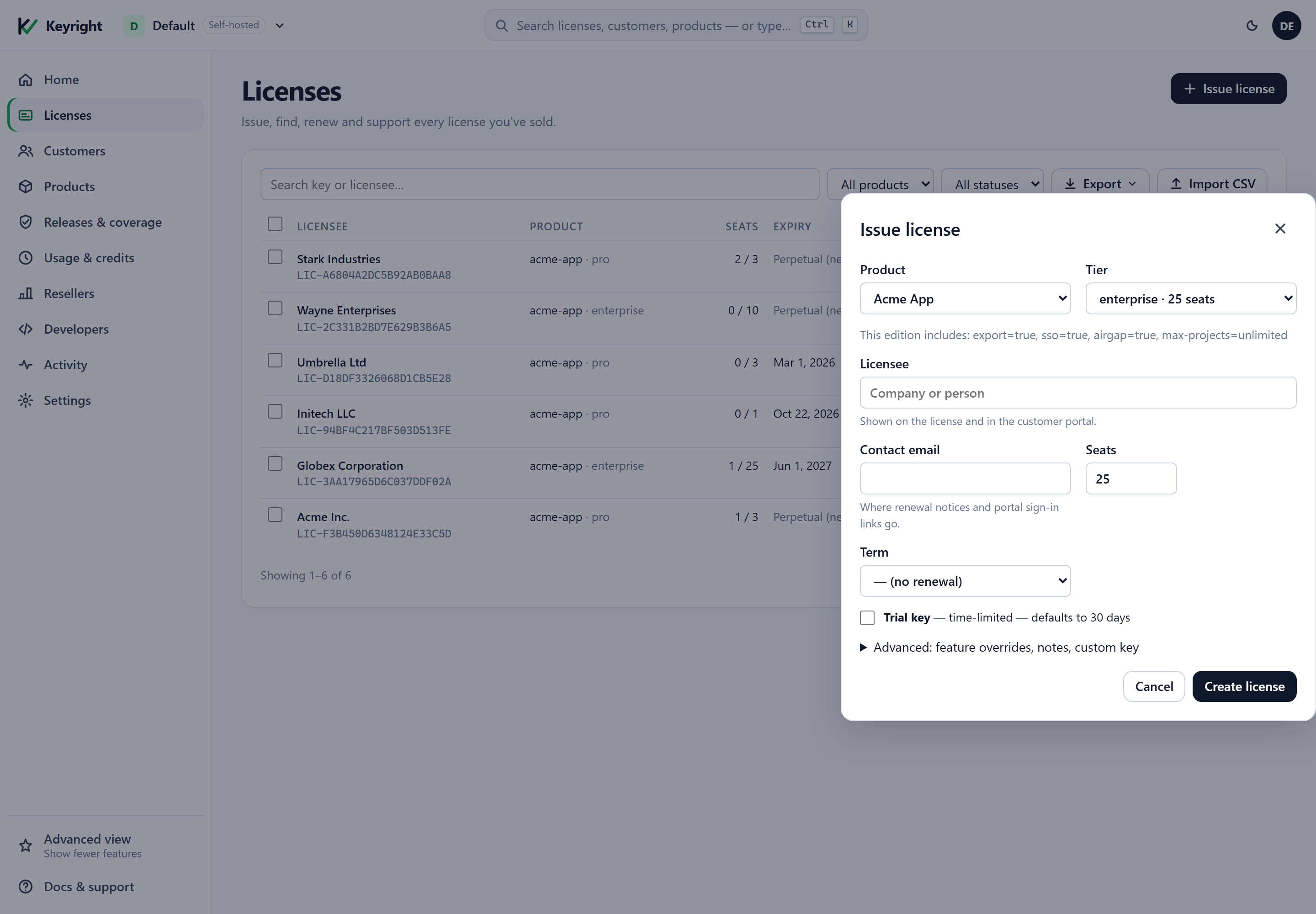
3. Issue licenses as usual
Nothing changes in how you issue: Licenses → Issue license (or POST /admin/licenses, or your store’s fulfillment webhook). At issue, the edition’s policy expands into terms on the new license. The drawer shows the edition’s features; the coverage it carries is visible on the license page afterwards.
4. See and change a license’s coverage
A license page gains a Coverage tab (it appears automatically once the license has coverage, whatever your dashboard view). It shows the customer-facing sentence, the policy in effect, the newest registered version they can use, whether enforcement is on, a per-license coverage checker, and a plain-language history of every term the license has ever had.
Change coverage… applies a preset to this license — the way you handle a renewal (“Updates for a period” again), an upgrade (“One major version” 3), or a conversion to a subscription. Coverage can only grow here: the new terms are added next to the existing ones.
# apply a preset to one license (renewal / upgrade / conversion)
curl -X POST $BASE/admin/licenses/LIC-…/coverage/preset -H "X-Admin-Token: $TOKEN" -H "content-type: application/json" \
  -d '{"preset":"updatesForPeriod","periodMonths":12}'

# read a license's coverage: what's in effect, the sequence number, and the full ledger
curl $BASE/admin/licenses/LIC-…/coverage -H "X-Admin-Token: $TOKEN"
# -> { "configured":true, "mode":"enforced", "seq":3, "supportUntilUtc":"2027-10-09T00:00:00.0000000Z",
#      "activeGrants":[ { "id":"…", "min":"2.0.0", "maxExcl":"3.0.0", "dates":[], "channel":null,
#                         "reason":"purchase", "sourceRef":null, "createdUtc":"…", "active":true }, … ],
#      "ledger":[ … every term ever added, with "active":false for removed ones … ] }
Custom terms and the technical ledger
The collapsed Advanced: coverage history (technical) section is for support staff. Each row is one term with its version range, dates, channel, reason and status; from here you can add a custom term (a pinned version, a per-minor line, a window with explicit dates, a beta channel), remove an active term, pause / resume enforcement for this license, and download the signed coverage file.
# add a custom term: everything released in a window, on the beta channel, recorded as a promo
curl -X POST $BASE/admin/licenses/LIC-…/coverage/grants -H "X-Admin-Token: $TOKEN" -H "content-type: application/json" \
  -d '{"minVersion":null,"maxExclVersion":null,"dates":[{"from":"2026-10-01","to":"2026-12-31"}],
       "channel":"beta","reason":"promo","sourceRef":"launch-week"}'
# a pinned version: {"minVersion":"2.4.1","maxExclVersion":"2.4.2"}  — a per-minor line: {"minVersion":"2.4.0","maxExclVersion":"2.5.0"}

# remove an active term (recorded, never deleted)
curl -X POST $BASE/admin/licenses/LIC-…/coverage/revoke -H "X-Admin-Token: $TOKEN" -H "content-type: application/json" \
  -d '{"grantId":"<id from the ledger>","sourceRef":"refund #4821"}'

# pause enforcement for one license (the next block is stamped unenforced → every version runs); "enforced" resumes it
curl -X POST $BASE/admin/licenses/LIC-…/coverage/mode -H "X-Admin-Token: $TOKEN" -H "content-type: application/json" \
  -d '{"mode":"unenforced"}'
reason is one of purchase, renewal, upgrade, promo, fallback, migration, legacy; sourceRef is free text for your audit trail (an order id, a ticket). Version ranges compare major.minor.patch only — pre-release suffixes are ignored, so 2.5.0-beta is inside 2.x and 3.0.0-rc1 is not. Dates are calendar dates compared inclusively with no time-zone conversion.
5. Check any version for any license
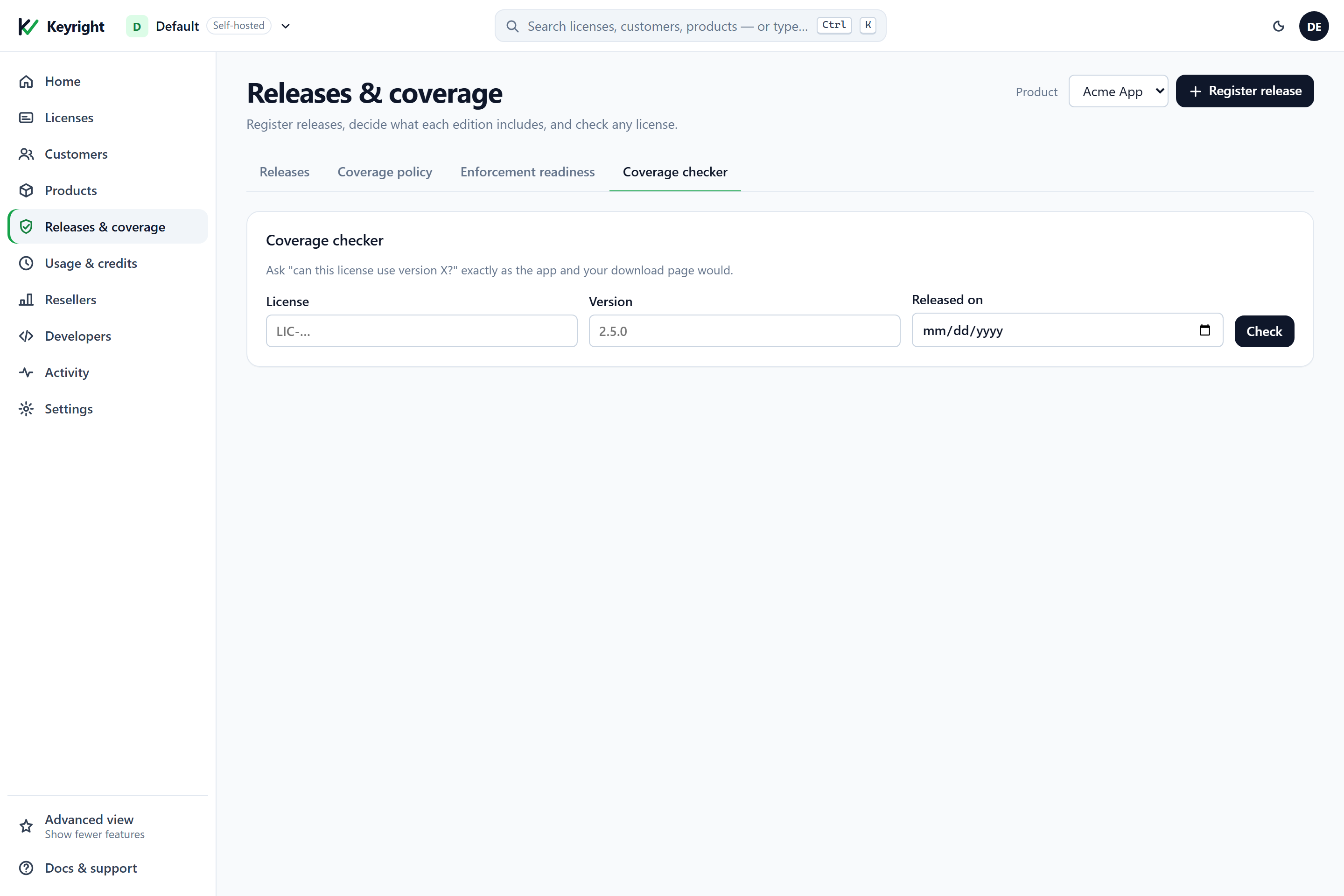
The coverage checker — on the hub’s Coverage checker tab and on every license’s Coverage tab — answers “can this license use version X?” exactly as the app and your download page would, with a one-line reason and, when the registry is populated, the newest version they can use.
curl "$BASE/admin/licenses/LIC-…/coverage/check?version=3.0.0" -H "X-Admin-Token: $TOKEN"
# -> { "status":"NotCovered", "reason":"OutsideVersionRange", "newestCovered":"2.4.0" }
# add &on=2026-11-01 to evaluate at an explicit entitlement date (default: the version's registered date, else today)
# add &channel=beta to check a preview build
Enforced, unenforced and “not configured”
Every coverage block carries a mode:
- Enforced — the normal state for a license with coverage terms: the app compares the running build against the terms.
- Unenforced — the block says “treat every version as covered”. Keyright issues unenforced blocks when you pause enforcement on a license, and — automatically, after a grace period — when a workspace’s plan or self-hosted license no longer includes coverage. Your customers are never locked out by your billing state; when the entitlement returns, enforced blocks resume with the terms intact.
- Not configured — a license that has never had coverage terms (an older license, or a workspace that doesn’t use coverage) gets a signed “not configured” block. The SDK reports it as
NotConfiguredand treats the license as unrestricted. This state only ever comes from a signed block: a missing block is never read as “unrestricted”, so stripping the block from a machine is not a way around enforcement.
Enforcement in your app is a build-time decision (KeyrightRequireCoverage, below). Builds without it ignore coverage entirely; builds with it ask Keyright, refresh once before refusing, and fail closed to an “import an updated license file” state when offline with nothing cached.
Applying a policy to existing customers
Saving a policy never touches licenses already issued. When you do want existing customers to gain something — you’ve introduced upgrade protection and want to extend it to everyone on 2.x, say — use Advanced: apply this policy to existing customers on the policy tab. Enter a reference version, click Preview who is affected… to see how many licenses would gain coverage for it (and how many already have it), then Apply. Coverage can only grow: nobody loses a version they can use today.
# preview: how many acme-studio licenses would newly cover 3.0.0 if everyone got a 2.x-plus-window term
curl -X POST "$BASE/admin/products/acme-studio/coverage/migrate?dryRun=true&version=3.0.0" \
  -H "X-Admin-Token: $TOKEN" -H "content-type: application/json" \
  -d '{"minVersion":null,"maxExclVersion":null,"dates":[{"from":"2026-10-09","to":"2027-10-09"}],"reason":"migration","sourceRef":"upgrade-protection-rollout"}'
# -> { "total":5, "coveredBefore":1, "coveredAfter":5, "gain":4, "applied":false }

# apply (dryRun=false): the same term is appended to every non-revoked license of the product
Legacy licenses: backfill before you enforce
A license issued before you adopted coverage has no terms. If you shipped a RequireCoverage build to such a customer with nothing done, they would be told to import a license file. The Enforcement readiness tab exists so that never happens: it counts the licenses that still lack terms and blocks the checklist until they are backfilled.
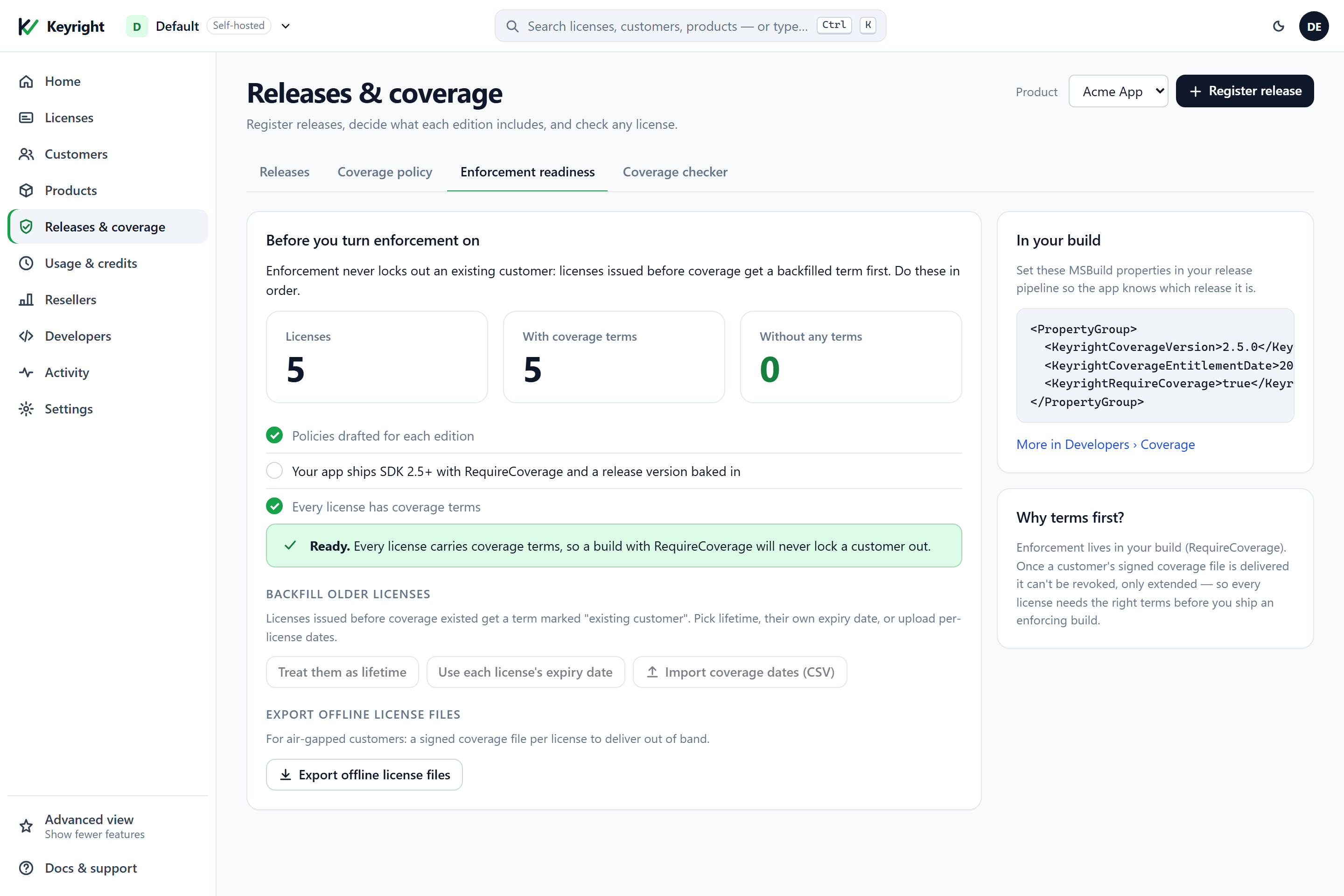
Pick one of three backfills — each gives the license a term marked existing customer (reason: legacy):
| Backfill | Result | When |
|---|---|---|
| Treat them as lifetime | Every legacy license covers every version, forever. | You never charged for updates before. |
| Use each license’s expiry date | A window ending on the license’s own expiry (perpetual licenses get lifetime). | Term licenses whose support ended with the license. |
| Import coverage dates (CSV) | Per-license support-end dates from a licenseId,supportUntil file; a blank date means lifetime. | You tracked support windows elsewhere. |
curl $BASE/admin/products/acme-studio/coverage/readiness -H "X-Admin-Token: $TOKEN"
# -> { "total":5, "configured":4, "missing":1 }

# backfill every license that still has no terms (defaultRule: "lifetime" or "supportEnd")
curl -X POST $BASE/admin/products/acme-studio/coverage/backfill -H "X-Admin-Token: $TOKEN" -H "content-type: application/json" \
  -d '{"defaultRule":"lifetime"}'
# -> { "backfilled":1 }

# or per license (the CSV upload sends the same shape)
curl -X POST $BASE/admin/products/acme-studio/coverage/backfill -H "X-Admin-Token: $TOKEN" -H "content-type: application/json" \
  -d '{"rows":[{"licenseId":"LIC-AAAA","supportUntil":"2027-03-12"},{"licenseId":"LIC-BBBB","supportUntil":null}]}'
Get the dates right before you ship an enforcing build: once a customer’s signed block has been delivered it can be extended but not meaningfully taken back. Online customers pick up their backfilled terms on the next refresh; air-gapped ones need the export below.
Air-gapped customers
A machine that never reaches your service can’t receive the block on activation. Deliver it as a file instead:
- One license: the Download signed coverage file button on its Coverage tab (or
GET /admin/licenses/{id}/coverage/block→{ "block": "…" }). - Every license of a product: Export offline license files on the Enforcement readiness tab (or
GET /admin/products/{slug}/coverage/export→{ "product", "count", "items": [ { "licenseId", "coverageBlock" } ] }).
The file is the signed block envelope — JSON with a payload and a sig. Hand it to the customer alongside their offline license file or lease; their app imports it with ImportCoverageBlock (below). A renewal for an air-gapped customer is simply a newer file: it carries a higher sequence number, so it replaces the cached one, while an older file is refused. The export honours your entitlement exactly like activation does — unenforced blocks if the workspace no longer includes coverage — so it can never lock anyone out.
What the customer sees
In the customer portal
The portal’s license page shows the coverage sentence — possession-framed, no internal terms — right under the license summary, and the Devices list below it. Customers learn what they own without a support ticket.
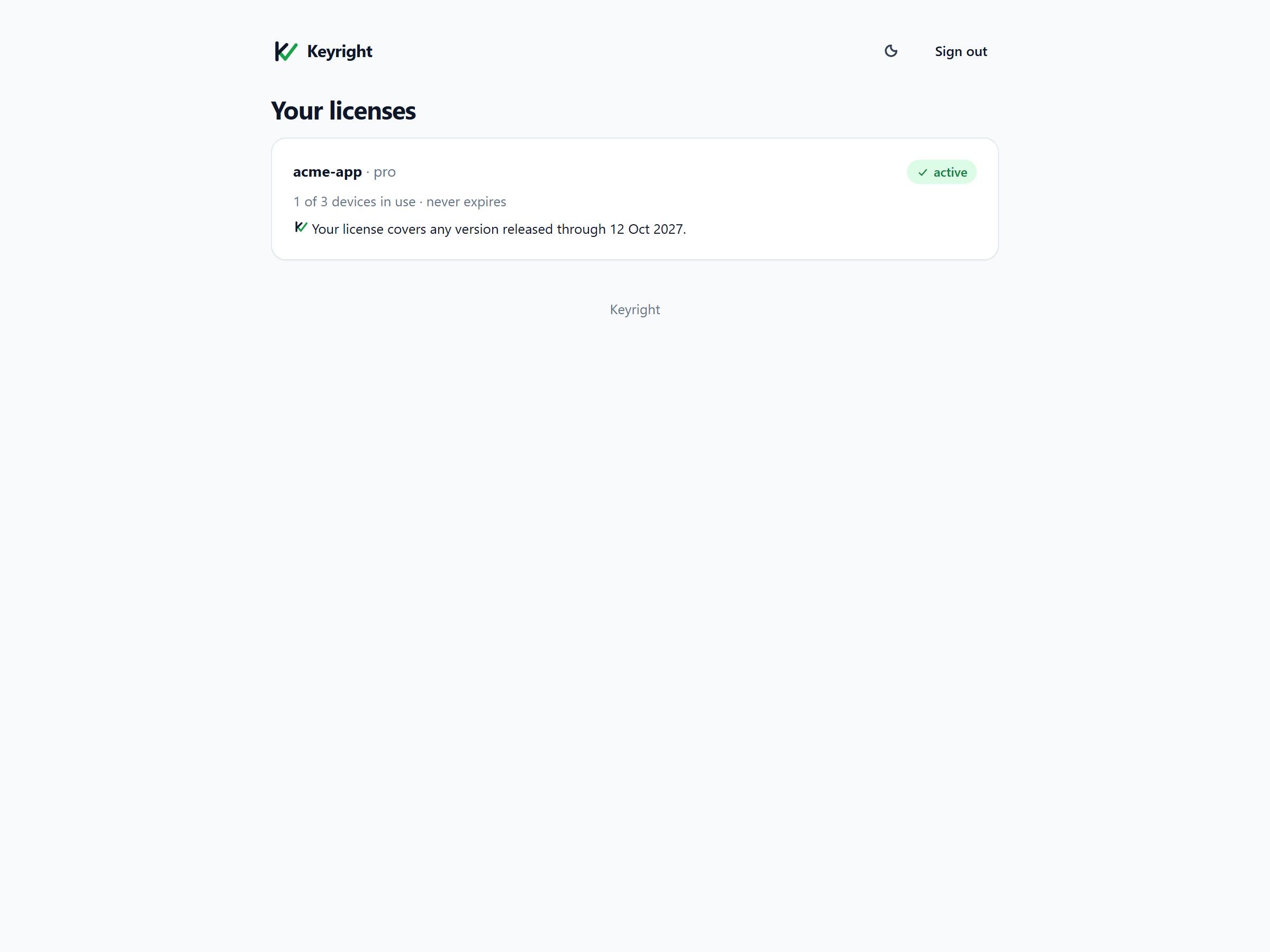
If you run your own customer portal, the signed-in portal API returns the same sentence and the derived support-until date: GET /portal/license/{id}/coverage → { "status": "Your license covers …", "supportUntilUtc": "2027-10-09T00:00:00.0000000Z" } (null when coverage isn’t bounded by a date).
The default sentences and messages
These are the strings the SDK and the API produce (the dashboard previews them with the same meaning). All are overridable per state — see messages below.
| State | Default text |
|---|---|
| Lifetime | Your license covers every version. |
One major ({line} = “Acme Studio 2”) | Your license covers all Acme Studio 2 versions. |
| Window (period / subscription) | Your license covers any version released through 9 Oct 2027. |
| Major + upgrade protection | Your license covers all Acme Studio 2 versions, plus any version released through 9 Oct 2027. |
| Open-ended window | Your license covers every version released so far. |
| Not covered — window lapsed | This version (2.5.0) was released after your updates ended on 9 Oct 2027. You can keep using 2.4.0. Renew to use 2.5.0. (without a registry the “keep using” sentence is omitted) → action Renew |
| Not covered — outside version range | This version (3.0.0) isn’t included in your Acme Studio 2 license. You can keep using 2.4.0. Upgrade to use 3.0.0. → action Upgrade |
| Unavailable offline | Acme Studio couldn’t confirm that your license includes this version while offline. Connect to the internet, or import an updated license file from Acme Software. → action Import license file |
In your app (.NET SDK)
Coverage needs two things from your build: what release it is (so it can be compared against the terms) and whether it should enforce. Both are compile-time properties, so a shipped binary can’t be talked out of them at runtime.
1. Embed the build’s release identity (MSBuild)
The Keyright.NET package ships MSBuild targets that read these properties and compile them into the assembly as metadata the SDK reads back at startup:
<!-- in the app's .csproj, or Directory.Build.props — normally set from your release pipeline -->
<PropertyGroup>
  <KeyrightCoverageVersion>2.4.0</KeyrightCoverageVersion>                 <!-- this build's product version (major.minor.patch) -->
  <KeyrightCoverageEntitlementDate>2026-10-01</KeyrightCoverageEntitlementDate>  <!-- the date coverage is judged against (yyyy-MM-dd) -->
  <KeyrightCoverageChannel>stable</KeyrightCoverageChannel>               <!-- stable (default) or beta -->
  <KeyrightRequireCoverage>true</KeyrightRequireCoverage>                 <!-- bake enforcement into this build -->
  <!-- optional: a hard self-expiry for preview builds, read back as CoverageBuildInfo.BuildExpiryUtc -->
  <!-- <KeyrightCoverageBuildExpiry>2027-01-01T00:00:00Z</KeyrightCoverageBuildExpiry> -->
</PropertyGroup>
From CI, pass them on the command line so the pipeline is the single source of truth:
dotnet publish -c Release \
  -p:KeyrightCoverageVersion=2.4.0 \
  -p:KeyrightCoverageEntitlementDate=2026-10-01 \
  -p:KeyrightRequireCoverage=true
Rules the targets enforce and the SDK relies on:
- A
KeyrightRequireCoverage=truebuild must setKeyrightCoverageEntitlementDate; otherwise the build fails with error KR0001 (there would be nothing to evaluate against). Unset properties emit no metadata at all. - A hotfix inherits its base release’s entitlement date. Build
2.3.1withKeyrightCoverageEntitlementDate=2026-07-02(2.3.0’s date) and it stays covered for everyone who had 2.3.0 — and register it with the same--entitlement-dateso the checker and the registry agree. - Pre-release suffixes (
2.5.0-beta.1) are ignored for range matching; use the channel for betas.
At runtime the embedded values are available as CoverageBuildInfo.Current — Version, EntitlementDate, Channel, BuildExpiryUtc, RequireCoverage, and HasMetadata.
2. Check coverage at startup
The SDK already does half the work: every ActivateAsync (and every lease refresh) sends the build’s version and entitlement date, receives the signed coverage block with the lease, verifies it against your embedded public key, and caches it next to the license. You add one call:
using Keyright.Client;
using Keyright.Coverage;

static readonly KeyrightClient License = KeyrightClient.Initialize(new KeyrightOptions
{
    Product         = "acme-studio",
    PublicKeyBase64 = "MIIBIjANBgkq...",              // the same key verifies licenses, leases AND coverage blocks
    ServiceUrl      = "https://licensing.acme.example",
});

static async Task<bool> GateOnCoverageAsync(CancellationToken ct)
{
    var build = CoverageBuildInfo.Current;
    if (!build.RequireCoverage) return true;          // a non-enforcing build ignores coverage entirely

    // Decides from the cached block; if not covered (or nothing cached) it silently refreshes the licence once
    // (short timeout, offline is fine) and decides again. Never throws for network problems.
    CoverageCheckResult check = await License.CheckCoverageAsync(ct: ct);

    if (check.IsCovered)                              // Covered, or NotConfigured (coverage imposes no restriction)
        return true;

    // Not covered, or unavailable offline: build the message + the single action and let the app decide what to do.
    var message = BuildMessage(check);
    switch (check.Status)
    {
        case CoverageCheckStatus.UnavailableOffline:  // no usable block and the refresh failed (air-gapped)
            ShowImportLicenseFile(message);           // "…import an updated license file from Acme Software."
            return false;
        case CoverageCheckStatus.NotCovered:
            return ShowNotCovered(message);           // block, run read-only, or just inform — your choice
        default:
            return true;
    }
}
CheckCoverageAsync(version?, entitlementDate?) defaults both arguments to the build’s embedded metadata, so the parameterless call answers “is this build covered?”. It throws only if there is no version at all (none embedded and none passed). The result:
| Member | Meaning |
|---|---|
Status | Covered, NotCovered, NotConfigured, or UnavailableOffline. |
IsCovered | true for Covered and NotConfigured — the app may run. |
Reason | For NotCovered: WindowLapsed (their updates ended before this release → renew) or OutsideVersionRange (this version line isn’t theirs → upgrade). |
NewestCovered | The newest covered version when the block or registry makes it known (SemVer?), for “you can keep using 2.4.0”. |
Refreshed | Whether a silent refresh was attempted during this check. |
UnavailableOffline is deliberately distinct from NotCovered: it means nothing is cached and the service couldn’t be reached, which on an enforcing build is a “please import the file we sent you” situation — never “your license is invalid”, and never a prompt for the key.
3. Decide locally, any time
For your own in-app messaging or updater — “should I show the 3.0 banner?”, “what’s the newest version this customer can install?” — read the cached block without any network:
CoverageInfo cov = License.GetCoverage();   // from the cached, verified block; never contacts a distribution endpoint
if (cov.Available)
{
    bool notConfigured  = cov.IsNotConfigured;      // signed "no restriction" block
    CoverageMode mode   = cov.Mode;                 // Enforced / Unenforced
    DateTime? supportTo = cov.SupportUntilUtc;      // latest window end, or null when not date-bounded
    long seq            = cov.Seq;                  // the block's sequence number (anti-rollback)

    foreach (Grant g in cov.Grants)                 // the terms: version range, date intervals, channel, reason
        Console.WriteLine($"{g.Versions?.MinInclusive}..{g.Versions?.MaxExclusive} {g.Reason}");

    CoverageDecision d = cov.Decide(SemVer.Parse("3.0.0"), CalendarDate.Parse("2026-11-01"), channel: null);
}

// One-liner: is this version covered for this licence? Entitlement date and channel default to the build's metadata.
bool can30 = License.IsCovered("3.0.0");
bool canOn = License.IsCovered("3.0.0", entitlementDate: "2026-11-01", channel: "beta");
IsCovered returns true for a not-configured license and false when no valid block is available — a missing block is never “covered”. GetCoverage() returns CoverageInfo.Unavailable (Available == false) when the license itself doesn’t validate or nothing is cached.
4. Messages and the single action
CoverageMessaging turns a result into the customer-facing text and exactly one call-to-action, with your URLs and your wording:
static readonly CoverageMessageOptions Wording = new()
{
    Product              = "Acme Studio",
    Vendor               = "Acme Software",
    UpdatesTerm          = "maintenance",            // default "updates"; also "support"
    LineTemplate         = "{product} {major}",      // how a version line reads, e.g. "Acme Studio 2"; or "{major}.x"
    RenewUrl             = "https://acme.example/renew?key={key}",
    UpgradeUrl           = "https://acme.example/upgrade",
    ImportLicenseFileUrl = "https://acme.example/support/offline-license",
    RenewLabel           = "Renew maintenance",
    FormatDate           = d => d.ToString("d MMMM yyyy", new CultureInfo("en-GB")),   // {date} must read unambiguously
};
// Localize or rewrite any state: keys are the CoverageMessaging.Key* constants, templates may use
// {product} {version} {newestCovered} {line} {date} {vendor} {updatesTerm}
// Wording.TemplateOverrides[CoverageMessaging.KeyWindowLapsed] = "…";

static CoverageMessage BuildMessage(CoverageCheckResult check)
{
    var cov = License.GetCoverage();
    int? lineMajor = cov.Grants.Where(g => g.Versions?.MinInclusive is not null)
                               .Select(g => (int?)g.Versions!.MinInclusive!.Value.Major).Max();
    var ctx = new CoverageMessaging.Context
    {
        Version       = CoverageBuildInfo.Current.Version ?? "",
        LineMajor     = lineMajor,                  // for {line}
        BoundaryDate  = cov.SupportUntilUtc,         // for {date} in "window lapsed"
        NewestCovered = check.NewestCovered?.ToString(),
    };
    return CoverageMessaging.Build(check.Status, check.Reason, ctx, Wording);
}

// message.Text        -> "This version (3.0.0) isn't included in your Acme Studio 2 license. You can keep using 2.4.0. Upgrade to use 3.0.0."
// message.Action      -> CoverageAction.Upgrade   (Renew | Upgrade | ImportLicenseFile | None)
// message.ActionUrl   -> "https://acme.example/upgrade"
// message.ActionLabel -> "Upgrade"
The mapping is fixed so the UI always renders the right button: window lapsed → Renew, outside the version range → Upgrade, unavailable offline → Import license file; Covered and NotConfigured produce an empty message with CoverageAction.None. For an in-app status line (“what do I own?”) use CoverageMessaging.StatusSentence(cov.Grants, cov.IsNotConfigured, Wording) — the same sentence the portal shows.
5. Import a coverage file (air-gapped)
string envelopeJson = File.ReadAllText("northwind.coverage.json");   // from your export or the license's download button
CoverageVerifyResult r = License.ImportCoverageBlock(envelopeJson);    // verifies, binds to the licence, enforces anti-rollback; no network
if (!r.Ok)
{
    // r.Status: Malformed | UnknownKey | BadSignature | RolledBack | WrongBinding | UnsupportedVersion
    ShowImportError(r.Status);
}
A RolledBack result means the file is older than what the machine already has (lower sequence number) and was ignored; WrongBinding means it was issued for a different license or product; UnknownKey means it was signed by a key your build doesn’t embed — during a key rotation, keep the previous public key in AdditionalPublicKeysBase64 exactly as you do for licenses and leases.
6. Gate your own downloads: the eligibility API
Your download page or updater asks Keyright the same question server-to-server, authenticated by the customer’s key. Keyright answers; you decide whether to serve the file.
curl -X POST $BASE/v1/coverage -H "content-type: application/json" \
  -d '{"key":"LIC-…","product":"acme-studio","version":"2.5.0"}'
# -> { "eligible":true, "licenseValid":true, "status":"Covered", "reason":"None", "newestCovered":"2.4.0" }
# optional: "on":"2026-11-01" (entitlement date; default = the registered date, else today), "channel":"beta"
eligible is licenseValid && (status is Covered or NotConfigured); status/reason are the raw decision so you can word the page yourself. From a .NET backend:
using var http = new HttpClient { BaseAddress = new Uri("https://licensing.acme.example/") };
var resp = await http.PostAsJsonAsync("v1/coverage", new { key, product = "acme-studio", version = "2.5.0" });
var e = await resp.Content.ReadFromJsonAsync<Eligibility>();
if (e is { Eligible: true }) ServeDownload("2.5.0"); else ShowWhy(e!.Status, e.Reason, e.NewestCovered);

record Eligibility(bool Eligible, bool LicenseValid, string Status, string Reason, string? NewestCovered);
Behaviour reference
| Situation | What happens |
|---|---|
| Customer renews / upgrades | You add terms (dashboard or API). The app picks them up on its next launch or refresh — no key re-entry, no reactivation. |
| Customer rolls back to an older build | Still covered: an older version is inside every version line and before every window. |
| Two versions side by side, or different versions per machine | Each build evaluates itself against the same license; seats are per machine as before. |
| Clock moved back | Coverage compares the build’s signed entitlement date with the terms, never the local clock; the existing clock-tamper guard still applies to trials and term licenses. |
| Block stripped or edited | Signature or binding fails → the SDK refreshes; offline with nothing valid → UnavailableOffline. Never “covered”. |
| Older block replayed | Lower sequence number → refused; coverage stays at the newest accepted block. |
| Refund / revocation / transfer | Unchanged: revoke the license (the app drops to Free on refresh); transfers keep the terms. |
| Your plan no longer includes coverage | After a grace period the service issues unenforced blocks; enforcing builds keep running; terms are preserved and enforced blocks resume on re-upgrade. |
Cloud vs Self-hosted
Coverage behaves identically in both modes — the policy presets, the signed block, the MSBuild props and the SDK calls are the same. What differs:
- Entitlement. On Keyright Cloud coverage is part of the top plan (Scale and Enterprise); lower plans see it locked with an upgrade prompt. Self-hosted, it’s included in licenses that carry the coverage feature. In both cases a workspace that loses the entitlement gets unenforced blocks after a grace period rather than locking customers out, and enforced blocks resume when the entitlement returns.
- Base URL / token.
$BASEishttps://keyright.delta1labs.comon Cloud or your own issuing-service URL self-hosted;$TOKENis your dashboard session token (Cloud) or tenant/env admin token (self-hosted). TheServiceUrlandPublicKeyBase64in the SDK point at the matching instance and its signing key. - Everything else — the eligibility API (
/v1/coverage), the offline export/import, the registry — is the same surface in both modes.
Verify
- Give an edition a policy (dashboard or
coveragePolicyon the tier upsert), issue a license, and open its Coverage tab — confirm the plain-language sentence and the terms match the preset. - Run the coverage checker (or
GET /admin/licenses/{id}/coverage/check?version=…) for a version you expect to be covered and one you expect to be not covered — confirm the status and reason (WindowLapsedvsOutsideVersionRange). - Build your app with
KeyrightCoverageVersion+KeyrightCoverageEntitlementDate+KeyrightRequireCoverage=true, activate with a covered license, and confirmCheckCoverageAsyncreturnsCovered; bump the build’s version past the terms and confirm it returnsNotCoveredwith the right single action. - For your download page,
POST /v1/coveragewith a customer key + version and confirmeligiblematches what the app sees. - Air-gapped: download the signed block,
ImportCoverageBlockit on a disconnected machine, and confirm the same decision with no network.
See also
- .NET SDK integration — the full client walkthrough this builds on.
- Admin dashboard — every screen, and the Basic / Intermediate / Advanced views.
- Activate, deactivate & move seats — leases, offline files and air-gapped activation.
- Meter usage & sell credits — sell consumption on top of a license.
- HTTP API reference — the endpoint map.