Decompile any .NET assembly into clean, readable C#
A free .NET decompiler you can actually move through — Go to Definition, Find All References, Go To All, call & type hierarchy, C#/IL views and project export. Accurate, modern C#, powered by the ICSharpCode (ILSpy) engine.
100% free · Windows x64 · no account required · static analysis only — never runs your code
A developer tool for legitimate use — inspect your own binaries, dependencies and obfuscation output. Use only on software you have the right to analyze; respect others’ licenses and IP.
// decompiled from System.Text.Json.dll
public static partial class JsonSerializer
{
    public static TValue? Deserialize<TValue>(string json,
        JsonSerializerOptions? options = null)
    {
        return Deserialize<TValue>(json.AsSpan(), options);
    }
}
// F12 on any symbol → jump to its definitionHow it works
From binary to browsable source in four steps
Point Glass at a .dll or .exe and it does the rest — decompile, then read and navigate it like the original project.
The decompiler
From IL to readable C#
A .NET DLL ships as stack-based IL, not source. Glass reconstructs the C# behind it — the same engine that powers ILSpy, wrapped in a UI built for navigating real code.
.method public hidebysig instance
        int32 Total() cil managed
{
  .maxstack 2
  ldarg.0
  ldfld    int32 Cart::_qty
  ldarg.0
  ldfld    int32 Cart::_price
  mul
  ret
}
// Cart.cs — decompiled
public class Cart
{
    public int Total()
    {
        return _qty * _price;
    }
}
Every symbol in the C# view is live: F12 jumps to a definition, Shift+F12 lists every reference, and you can flip any member back to its IL at any time.
Why Glass
Built to navigate, not just display
Most decompilers show you code and leave you to scroll. Glass lets you move through it — jump to definitions, find every caller, search everything, and export it back to a project.
Decompilation
Turn compiled IL back into C# that reads like the source it came from.
- Accurate, modern C#. Powered by the ICSharpCode (ILSpy) engine, so async/await, pattern matching, records and the latest language features come back intact.
- C# and IL, side by side. Read the reconstructed C# or flip any member to its underlying IL, with code folding and syntax highlighting.
- Static analysis only. Glass reads metadata and IL and reconstructs C#. It never executes the assembly it inspects.
Navigation
Move through an unfamiliar assembly the way you move through your own code.
- Go to Definition & references. F12 or Ctrl+Click jumps to any symbol; Shift+F12 streams every reference — resolved from the decompiler’s syntax tree, not a text match.
- Call & type hierarchy. Walk callers and callees, and base and derived types, to understand how a codebase fits together.
- Breadcrumbs & history. A namespace ▸ type ▸ member trail plus back/forward navigation mean you never lose your place.
Search & export
Find anything across every loaded assembly — then take the source with you.
- Go To All (Ctrl+T). Fuzzy-open any type or member across every loaded assembly in a keystroke.
- Find in Files. Full-text search the decompiled source for any string, signature or literal.
- Export to a project. Reconstruct a browsable C# project — or a single member — from any assembly, in the app or on the command line.
Platform
A fast, portable Windows build with nothing to license or sign up for.
- Reads the whole .NET line. Managed assemblies from .NET Framework and .NET 6, 8, 9 and 10; native binaries are rejected with a clear message.
- Responsive on huge assemblies. Lazy loading and off-thread decompilation stay fast across projects with thousands of types.
- Free, portable, no account. A self-contained Windows x64 build — unzip and run. Free forever, no license and no sign-up.
Who it's for
When you need to see inside a DLL
Every .NET developer hits the moment where the source isn't there — a dependency, a build artifact, a package you didn't write. Glass is for that moment.
Debugging a dependency
A NuGet package throws deep in a stack trace with no source and no symbols. Open the DLL, read the exact method that failed, and understand the behaviour instead of guessing at it.
Verifying what you ship
Confirm a build produced what you expected, check that a third-party package matches what its author published, and see exactly what an assembly exposes before it goes out the door.
Learning how it works
The framework, a favourite library, or a clever pattern — step into the real implementation and read how experienced authors actually solved the problem.
See it in action
Clean code, fast navigation
Decompiled C# you can read, search, and jump around in — instantly.
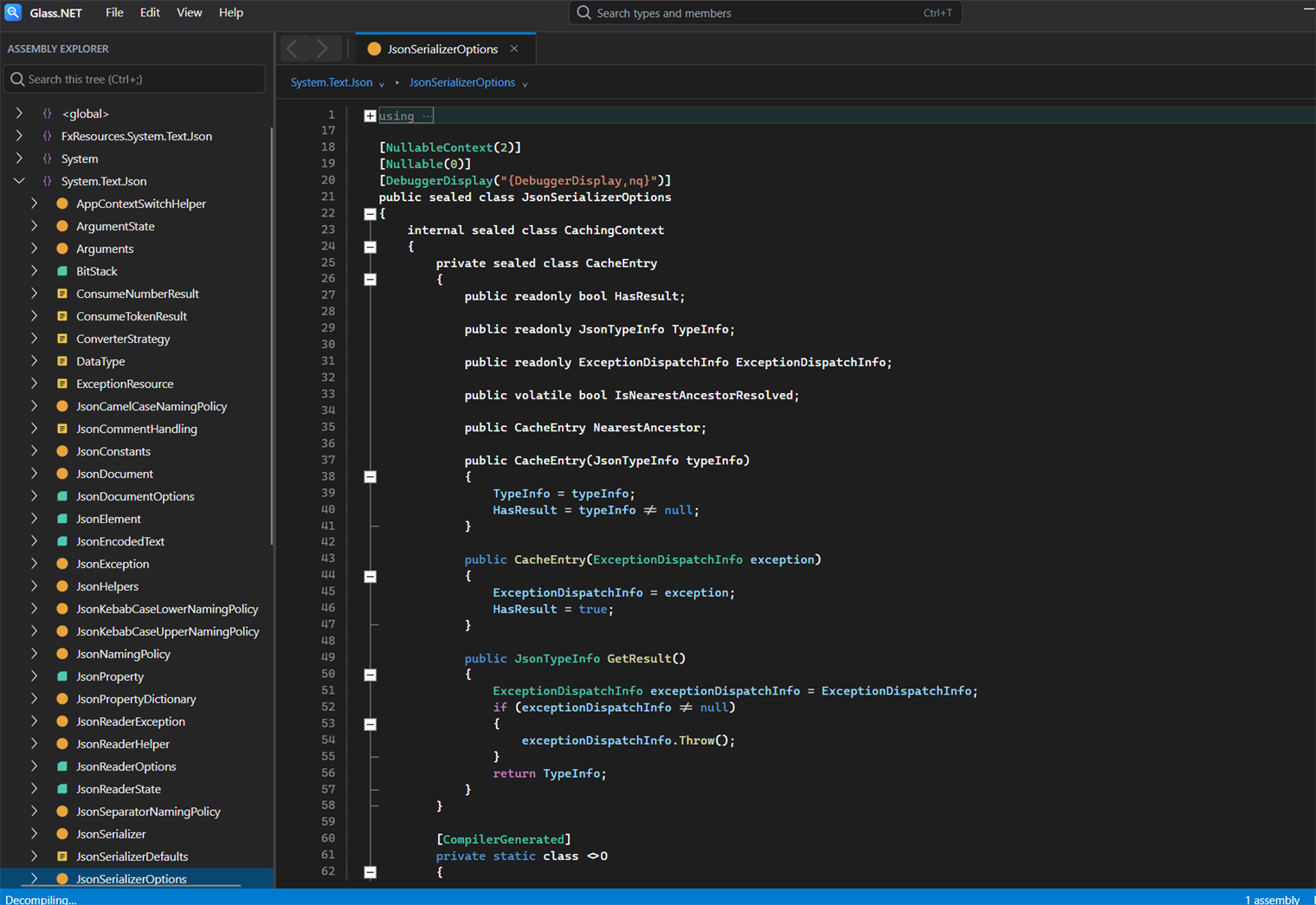
Browse any assembly and read decompiled C# in a clean dark theme.
A modern ILSpy, dnSpy & .NET Reflector alternative
Glass.NET pairs the proven ILSpy decompiler engine with a fast, keyboard-driven navigation model. It's free — no seats and no sign-up, unlike paid tools such as .NET Reflector — it doesn't run the code it inspects (static analysis only), and it stays quick on real-world assemblies with thousands of types.
Download Glass.NET
No license, no seats, no sign-up. Unzip the Windows build, open an assembly, and press F12. Our gift to the .NET community — and a preview of the craftsmanship in every Delta1 Labs tool.